LangChain vs LangGraph: Which Framework to Use for AI Agent Development?
 Sasikumar
- Use LangChain when your workflow is simple and linear and you need to build fast.
- Use LangGraph when your AI agent needs to loop, make decisions, remember state, or wait for human input.
- Best practice in 2026: Use both together. LangChain handles the tools and integrations. LangGraph handles the agent execution loop.
The Problem Most Teams Face
You want to build an AI agent for your business.
You search online. You find LangChain. You also find LangGraph.
Now you are confused.
Are they the same? Is one better? Do you need both?
You are not alone. This is the most common question developers and CTOs ask before starting an AI agent project.
Here is the good news: you do not have to choose one and abandon the other.
What Is LangChain?
LangChain is an open-source framework for building applications powered by large language models (LLMs) like GPT-4, Claude, and Gemini.
Think of LangChain as a toolkit.
It gives you ready-made parts to connect:
- LLMs (OpenAI, Anthropic, Google AI)
- Vector databases (Pinecone, Weaviate, Chroma)
- Tools (web search, APIs, calculators)
- Memory (short-term conversation history)
- Output parsers and prompt templates
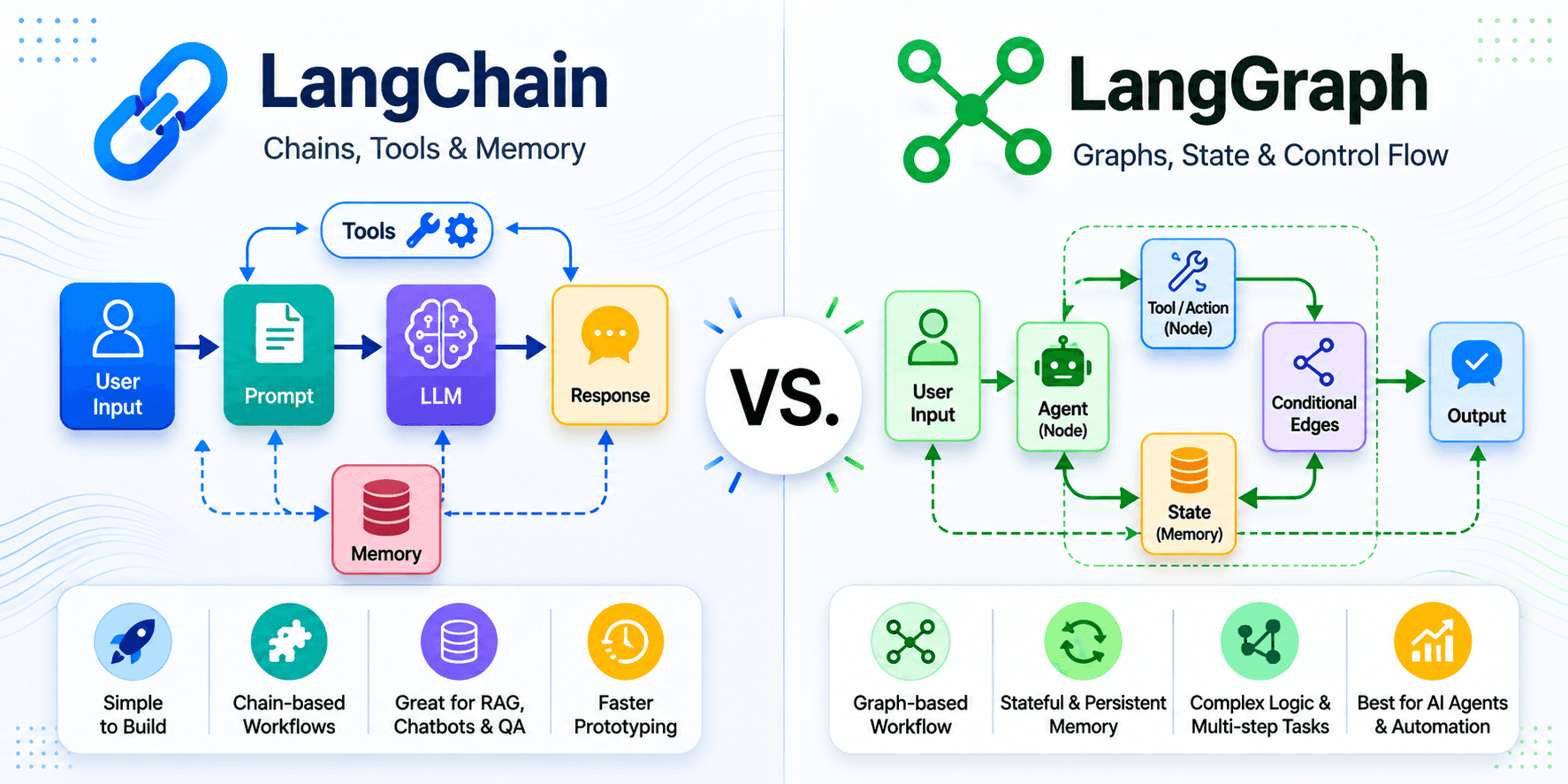
LangChain works best for linear workflows — where you define the steps and they run in a fixed order.
Simple example of a LangChain workflow:
User question → Search vector database → Pass results to LLM → Return answer
Each step flows into the next. No loops. No decisions. No branching.
This is called a DAG (Directed Acyclic Graph) — data goes in one direction only.
What LangChain Is Good At
- RAG (Retrieval Augmented Generation) — answering questions using your documents
- Simple chatbots — FAQ bots, customer service assistants
- Data pipelines — summarizing documents, extracting structured data
- Rapid prototyping — going from idea to working demo in hours
- Linear automations — where every step is predictable
Real example: A legal firm needed to summarize client contracts and flag unusual clauses. Every document followed the same steps. LangChain built this in hours.
What Is LangGraph?
LangGraph is built on top of LangChain by the same team at LangChain Inc.
It was created to solve one problem: LangChain cannot handle workflows that loop, branch, or need to pause.
Think of LangGraph as the brain that controls the toolkit.
Instead of a straight line, LangGraph uses a graph structure — nodes connected by edges. Each node is a function or action. Each edge defines what happens next. And crucially, the graph can loop back on itself.
This is called a cyclic state machine – and it is what makes AI agents truly intelligent.
What LangGraph Adds That LangChain Cannot Do
- Loops and retries — agent tries something, evaluates the result, tries again if needed
- Persistent state — agent remembers everything across many steps, even after a crash
- Human-in-the-loop — agent pauses and waits for a human to approve before continuing
- Multi-agent coordination — multiple specialized agents working together, passing control between each other
- Time-travel debugging — replay any point in your agent's history using checkpoints
- Conditional branching — agent takes different paths based on what it discovers
Important update: Since October 2025, LangChain's own create_agent function runs on LangGraph's execution engine under the hood. LangGraph is now the official recommended approach for all agent workflows. LangChain's AgentExecutor is deprecated and reaches end-of-life in December 2026.
LangChain vs LangGraph: Side-by-Side Comparison

The Key Difference in One Sentence
LangChain is a straight road. LangGraph is a road with turns, decision points, and the ability to go back if you took a wrong turn.
When Should You Use LangChain?
Choose LangChain when your workflow has a clear start, middle, and end — and those steps never change.
Use LangChain if:
- You are building a chatbot that answers FAQs
- You need a document summarizer or content extractor
- You are building a RAG system — letting users ask questions about your private data
- You need a quick prototype to validate an idea before investing in full development
- Your workflow is fully predictable – the same inputs always produce the same steps
Real business examples perfect for LangChain:
- Customer FAQ bot — reads your product docs and answers questions
- Contract summarizer — reads long documents and pulls out key terms
- Email classifier — reads incoming emails and tags them by category
- Product recommendation engine — takes user input and returns relevant suggestions
When Should You Use LangGraph?
Choose LangGraph when your AI agent needs to think, decide, loop, or wait.
Use LangGraph if:
- Your agent needs to try something and check if it worked before moving on
- You need human approval before the agent takes a high-risk action
- You are building a multi-agent system where specialists hand off tasks to each other
- Your agent runs long tasks that might take minutes or hours
- You work in a regulated industry (finance, healthcare, legal) and need an audit trail of every decision
- You need the agent to recover automatically if something fails midway.
Real business examples built for LangGraph:
- AI sales agent — finds leads, researches them, drafts outreach, evaluates responses, follows up automatically
- AI support agent — reads ticket, checks order history, tries to resolve, escalates to human if it cannot
- AI coding agent — writes code, runs tests, fixes errors, retries until tests pass
- AI finance agent — monitors accounts, flags anomalies, waits for compliance officer approval before acting
- Multi-agent research system — one agent searches, one agent writes, one agent fact-checks, all coordinated by a supervisor
How LangGraph Works: A Simple Explanation
Imagine you ask an AI agent to research a topic, write a report, and email it to your team.
With LangChain (linear):
Search → Write → Send Email
If the search returns bad results, the agent still writes and sends. No way to fix it mid-flow.
With LangGraph (cyclic):
Search → Evaluate results → Results good? → Write → Review → Send Email ✅ → Results bad? → Search again with better query → Evaluate again → ... → Report needs approval? → Pause → Wait for human → Resume → Send ✅
The agent makes decisions at every step. It loops back when needed. It pauses for humans when required.
This is how real-world business processes actually work — and why LangGraph is now the standard for production AI agents.
The 2026 Best Practice: Use Both Together
Here is what experienced AI development teams do in 2026:
LangChain supplies the ingredients. LangGraph runs the kitchen.
In production, the stack looks like this:
- LangChain provides model connectors (OpenAI, Claude), vector store integrations (Pinecone, Weaviate), web search tools, prompt templates, and output parsers
- LangGraph provides the execution loop, state management, checkpointing, human-in-the-loop gates, and multi-agent coordination
- LangSmith (optional): observability and debugging layer — trace every node, every decision, every token
Companies like Uber, LinkedIn, and Klarna run LangGraph in production for multi-agent coordination at scale.
Common Mistakes Teams Make When Choosing
Mistake 1: Trying to build a complex agent with only LangChain
You can start with LangChain's create_agent. But as soon as your agent needs to loop, handle failures, or coordinate with other agents, you will hit a wall. Teams often spend weeks adding custom code to work around LangChain's limitations, only to eventually rewrite in LangGraph.
Fix: If your agent will run in production and handle real business workflows, start with LangGraph from day one.
Mistake 2: Thinking LangGraph replaces LangChain
LangGraph is built on top of LangChain. It does not replace it. You still use LangChain's tools and connectors — LangGraph just provides the execution framework that controls them.
Fix: Think of them as a team, not competitors.
Mistake 3: Using LangGraph for a simple chatbot
LangGraph has a steeper learning curve. If you just need a basic FAQ bot or document summariser, LangGraph adds complexity without benefit.
Fix: Use LangChain for simple, linear use cases. Upgrade to LangGraph when complexity demands it.
Mistake 4: Ignoring state management
Many teams skip proper state design. When the agent fails mid-task, they have no way to resume from where it stopped.
Fix: LangGraph's built-in checkpointing (Postgres or Redis) saves state at every step. Enable it from the start.
LangGraph's 4 Killer Features You Cannot Get from LangChain Alone
1. Human-in-the-Loop (HITL)
LangGraph can pause an agent at any point — wait for a human to review, approve, or correct — and then resume exactly where it left off.
This is essential for:
- Finance agents before executing transactions
- Healthcare agents before updating patient records
- Legal agents before sending documents
2. Time-Travel Debugging
LangGraph Studio lets you replay any run step by step. You can see exactly what state the agent was in at each node, branch off alternative paths, and find the exact point where something went wrong.
For production agents handling real business data, this saves hours of debugging time.
3. Multi-Agent Supervisor Pattern
LangGraph's supervisor pattern lets one orchestrator agent delegate tasks to specialised sub-agents:
- Supervisor → breaks the task into parts
- Researcher agent → gathers information
- Writer agent → creates content
- Validator agent → checks accuracy
- Supervisor → combines and delivers result
This mirrors how real teams work — and scales to handle complex, multi-step business processes.
4. Crash Recovery and Auditability
Every step is checkpointed. If the agent crashes halfway through a 50-step task, it resumes from the last checkpoint, not from the beginning.
For regulated industries (finance, healthcare, and legal), every decision is logged, creating a full audit trail for compliance.
Which Framework Does InfiniappsAI Use?
At InfiniappsAI, we build custom AI agents for businesses across 30+ countries.
Our standard production stack in 2026:
- LangGraph as the core execution framework for all agent workflows
- LangChain for tool integrations, vector store connectors, and LLM connections
- OpenAI GPT-4 / Claude as the reasoning layer
- Pinecone or Weaviate for long-term vector memory (RAG)
- LangSmith for observability and production monitoring
- AWS or GCP for scalable cloud deployment
For client projects requiring simple RAG or document processing, we use LangChain's LCEL directly.
For client projects requiring multi-step automation, human approval workflows, or multi-agent coordination, we build on LangGraph from day one.
This combination delivers agents that are fast to build, reliable in production, and scalable as business needs grow.
Quick Decision Guide
Answer these 3 questions:
Question 1: Does your agent need to loop or retry?
- No → LangChain may be enough
- Yes → Use LangGraph
Question 2: Does your workflow have human approval steps?
- No → LangChain may be enough
- Yes → Use LangGraph
Question 3: Will multiple agents need to work together?
- No → LangChain may be enough
- Yes → Use LangGraph
If you answered 'Yes' to any of these, use LangGraph + LangChain together.
Frequently Asked Questions
Is LangGraph better than LangChain?
LangGraph is not better — it is more advanced. LangGraph is built on top of LangChain and extends it for complex, stateful agent workflows. For simple applications, LangChain alone is faster and easier. For production agents, LangGraph is the right choice.
Can I use LangChain without LangGraph?
Yes. LangChain works perfectly for RAG systems, simple chatbots, and document pipelines. You only need LangGraph when your workflow requires loops, branching, state persistence, or human-in-the-loop.
Is LangGraph free to use?
Yes. Both LangChain and LangGraph are MIT-licensed and free to use. The LangGraph Platform charges approximately $0.001 per node execution for hosted deployments. LangSmith has a free tier with 5,000 traces per month.
What companies use LangGraph in production?
Uber, LinkedIn, Klarna, and Rippling are among the companies running LangGraph in production for multi-agent coordination at scale.
When should a business hire an AI agent development company?
When your use case requires production-grade reliability — not just a demo. Building on LangGraph requires expertise in graph modelling, state schema design, checkpoint configuration, and cloud deployment. A specialist team like InfiniappsAI can reduce development time from 6 months to 6 weeks.
What is replacing LangChain's AgentExecutor?
LangGraph. LangChain officially deprecated AgentExecutor in favour of LangGraph, which reaches end-of-life in December 2026. All new agent projects should be built on LangGraph.
Conclusion
LangChain and LangGraph are both powerful tools for AI development.
LangChain helps businesses build AI applications quickly and efficiently.
LangGraph helps businesses create intelligent, stateful, and autonomous AI agents.
If your goal is a chatbot or RAG application, LangChain is often the right choice.
If your goal is advanced AI agent development, workflow orchestration, and enterprise automation, LangGraph provides greater flexibility and control.
The most successful AI projects start with a clear business problem and then choose the framework that solves it best.
Ready to Build AI Agents?
Choosing the right framework is only the first step.
The real value comes from building AI agents that solve business problems, improve efficiency, and deliver measurable results.
At InfiniApps AI, we help businesses design, build, and deploy intelligent AI solutions using LangChain, LangGraph, RAG, and advanced AI agent architectures.
Our services include:
✅ AI Agent Development
✅ Enterprise AI Agent Development
✅ Custom AI Agent Development
✅ RAG Implementation
✅ AI Workflow Automation
✅ AI SaaS Platform Development
Talk to our team today and discover how AI agents can help your business automate processes, improve customer experiences, and scale faster.
About InfiniappsAI: InfiniappsAI is an AI development company based in India, specialising in custom AI agent development, RAG systems, and AI-powered SaaS products. With 11+ years of experience and clients across 30+ countries, InfiniappsAI builds production-grade AI systems using LangChain, LangGraph, OpenAI, and modern cloud infrastructure.