n8n vs Make vs LangGraph: Best AI Automation Tool 2027
 Sasikumar
AI automation has changed quickly.
A few years ago, automation mostly meant moving data from one application to another: a form submission created a CRM record, an email triggered a Slack message, or a payment updated a spreadsheet.
Now businesses want workflows that can read documents, understand customer requests, make decisions, call APIs, use business data, choose the next action, ask for approval, and continue working.
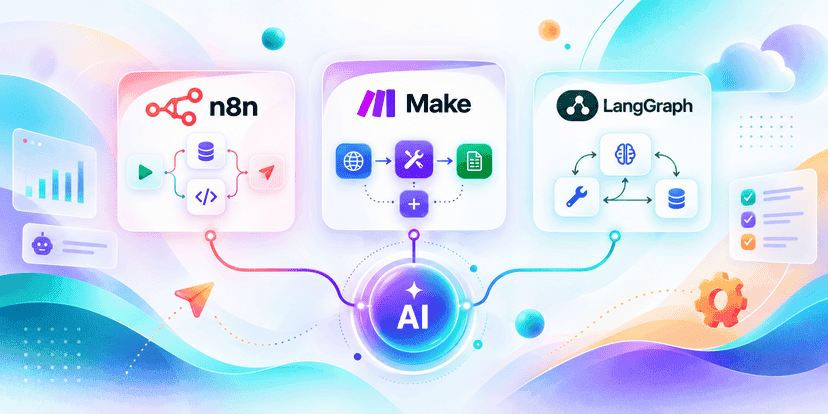
That is why tools such as n8n, Make, and LangGraph are receiving so much attention.
But comparing them can be confusing because they are not exactly the same kind of product.
n8n combines workflow automation with AI agents, integrations, custom code, MCP, human approvals, and self-hosting.
Make is a visual-first automation platform designed to connect business applications and increasingly build AI agents directly inside those workflows.
LangGraph is a developer-focused framework for building stateful, long-running and highly controlled AI agents.
So the real question is not:
“Which tool is the best?”
It is:
“Which tool fits the kind of AI automation we are trying to build?”
This guide compares n8n vs Make vs LangGraph for 2027 planning, based on the capabilities available as of September 2026.
n8n vs Make vs LangGraph: Quick Answer
If you need a fast answer before reading the full comparison:
Choose n8n when you need business automation, AI agents, APIs, custom logic and more technical control in one visual environment.
Choose Make when your priority is visual automation, quick implementation and connecting AI with a large number of business applications without building everything in code.
Choose LangGraph when you are building a custom AI product or complex agent where memory, state, human approval, long-running execution and precise developer control matter more than no-code convenience.
For some projects, the right answer may actually be two tools working together.
n8n vs Make vs LangGraph Comparison

n8n currently promotes a combination of 500+ integrations, AI agents, custom code, MCP and human-in-the-loop approvals, with self-hosting available for teams that need additional infrastructure control.
Make positions itself as a visual AI automation platform with 3,000+ pre-built application integrations. Its newer AI Agents experience brings agent creation, testing and debugging into the same scenario canvas used for normal automations.
LangGraph takes a different approach. It is a low-level orchestration framework for long-running, stateful agents and provides capabilities such as durable execution, persistence, streaming, memory and human-in-the-loop control.
That distinction is important.
Comparing these three tools only by the number of features can lead to the wrong decision.
What Is n8n?
n8n is a workflow automation platform that has increasingly moved into AI workflow automation and agentic systems.
Its biggest strength is the ability to combine visual workflows with technical control.
You can create a flow such as:
New support ticket → classify with AI → search internal knowledge → check customer account → draft response → request human approval → update CRM → send response
Most of that workflow can be built visually.
But when the workflow needs something more specific, developers can add custom JavaScript, API requests, database operations and conditional logic.
This makes n8n useful for teams sitting somewhere between traditional no-code automation and custom software development.
n8n also supports AI-agent workflows where agents can use models, memory and tools, while deterministic workflow logic can be placed around the AI components. Its current AI offering also emphasises approval checkpoints, auditability and explicit business rules rather than letting agents act without boundaries.
Where n8n Works Well
Imagine a sales team receiving hundreds of inbound leads.
A normal automation might simply copy each lead into a CRM.
An n8n AI workflow could go further.
It could collect the lead, research the company, classify the opportunity, check CRM history, generate a short account summary, decide which sales team should receive it and prepare a personalised outreach message.
Before sending anything externally, the workflow could require approval.
That combination of AI reasoning + structured workflow logic is one of n8n's strongest use cases.
Another Important n8n Advantage: Self-Hosting
For some companies, sending every workflow through a third-party managed platform is not desirable.
n8n supports self-hosting, which can give technical teams more control over deployment, network access and where their automation infrastructure operates.
Self-hosting does not automatically make a system secure. Your team still has to manage infrastructure, access controls, updates, credentials and monitoring properly.
But having the option matters for businesses with specific infrastructure or data requirements.
What Is Make?
Make approaches automation from a strongly visual direction.
Its scenario builder lets users connect applications and see how information moves through the workflow.
For example:
HubSpot → OpenAI → Google Sheets → Gmail → Slack
Each application appears as a module.
You can add filters, branches, transformations and conditions visually.
That has historically made Make particularly attractive to business teams that want sophisticated automation without maintaining a large custom codebase.
The platform now extends that model into AI agents.
Make's newer AI Agents experience lets users build, run, test and inspect agents directly inside the scenario builder. Make says agents can use modules, scenarios, MCP tools and other agents as tools, while knowledge files can provide additional business context.
Where Make Works Well
Consider a marketing operation.
A new webinar finishes.
You want to:
Collect the transcript.
Summarise it.
Extract key themes.
Create a CRM campaign.
Prepare email copy.
Draft LinkedIn posts.
Store content in your workspace.
Notify the marketing team.
That process touches many business applications but may not require a custom AI application.
Make is well suited to this type of automation because its major strength is connecting systems visually.
Its current product pages advertise more than 3,000 application integrations, giving teams a large ecosystem of ready-made connectors.
Make AI Agents Change the Picture
Traditional automation tools work best when the logic is predictable.
For example:
If payment succeeds: update account and send receipt
AI agents deal with less predictable tasks.
For example:
Understand this customer request. Decide what information is needed. Choose the correct systems. Gather the information. Decide what to do next.
Make recommendations using standard scenarios when the output should always follow fixed logic, and use agents when a task requires judgement, flexible reasoning or unstructured input.
That is a useful distinction no matter which automation platform you eventually choose.
What Is LangGraph?
LangGraph is fundamentally different.
It is not primarily trying to help a marketing manager connect HubSpot with Google Sheets.
It is designed for developers building AI agents as software systems.
LangGraph describes itself as a low-level orchestration framework for long-running, stateful agents. Its core features include durable execution, memory, persistence, streaming and human-in-the-loop workflows.
LangGraph reached its 1.0 milestone with a focus on durable state, persistence and approval-driven agent workflows.
Think about a research agent.
The agent may need to:
Understand a research question.
Create a plan.
Search several sources.
Evaluate results.
Change its search strategy.
Call specialist sub-agents.
Pause when human approval is needed.
Continue hours later.
Remember earlier decisions.
Recover if one step fails.
That is closer to the kind of problem LangGraph is designed to solve.
Why State Matters
Normal automation workflows often move forward:
A → B → C → D
Agents do not always behave like that.
They may operate more like:
A → B → C → B → D → human review → C → E
They can loop.
They can reconsider previous decisions.
They can pause.
They can wait.
They can return to an earlier state.
LangGraph's graph-based model is useful for representing this behaviour.
Its persistence model can checkpoint application state, so an interrupted agent does not necessarily need to start the entire task again. That checkpointing also enables human approval and editing during execution.
For simple automations, that level of control may be unnecessary.
For complex AI products, it can become extremely valuable.
n8n vs Make: Which Is Better for AI Automation?
This is probably the most direct comparison because n8n and Make overlap significantly.
Both can connect applications.
Both provide visual workflow builders.
Both support AI.
Both are moving toward AI agents.
The difference is often who is building the automation and how much control they need.
Make usually feels more natural when business teams want to automate SaaS applications visually.
n8n tends to become attractive when workflows move deeper into APIs, custom logic, databases, AI agents or developer-managed infrastructure.
A useful way to think about it is:
It starts from business automation and adds AI.
n8n combines automation, developer flexibility and AI orchestration more closely.
That is not an absolute rule. Both platforms continue to expand their capabilities.
But it is a useful starting point when evaluating them.
n8n vs LangGraph: Automation Platform or Agent Framework?
This comparison depends heavily on what you are building.
Suppose you want an AI system that reads support tickets and updates Zendesk, Slack and Salesforce.
n8n could be enough.
You would get integrations, workflow visibility and AI capabilities in one place.
Now suppose you are building the actual AI support product sold to thousands of companies.
The agent needs persistent memory, dynamic routing, specialised sub-agents, custom approval rules, streaming responses and sophisticated recovery behaviour.
LangGraph may make more sense as part of the product's application architecture.
The key difference is ownership of the software.
With n8n, you are often configuring an automation platform.
With LangGraph, your engineering team is building an agent runtime into your application.
That normally means more development effort.
It also means much deeper control.
Make vs LangGraph: Which One Should You Choose?
The gap is even clearer here.
Make is designed to let people visually assemble automations using existing applications.
LangGraph expects developers to build the agent behaviour.
If the requirement is:
“When a new lead arrives, research the company, summarize it and add everything to our CRM.”
Make it likely easier to start with.
If the requirement is:
“We are building a research agent inside our SaaS platform that plans investigations, stores state, calls several specialist agents, pauses for analyst approval and resumes across sessions.”
LangGraph is much closer to the problem.
Neither architecture is automatically superior.
They solve problems at different layers.
AI Agents vs Normal Automation: Do You Even Need an Agent?
One of the most expensive mistakes companies can make in 2027 is turning every automation into an agent.
An AI agent introduces uncertainty.
Normal automation is usually easier to predict.
If a workflow says:
New Stripe payment → generate invoice → email invoice → update CRM
You probably do not need an AI agent deciding what to do.
The rules are already clear.
But consider:
Read an incoming sales request → understand the company → decide whether it is relevant → research the account → choose the right sales motion → prepare next steps
Now AI reasoning may provide genuine value.
Make's own current guidance makes a similar distinction: deterministic tasks are better suited to standard scenarios, while agentic workflows make more sense when judgement and variable inputs are involved.
The best AI automation architecture often contains both.
Deterministic logic where the rules are known.
AI reasoning where judgement is genuinely required.
Which Tool Is Better for Integrations?
If your main requirement is connecting SaaS applications, Make currently has the larger advertised pre-built integration catalogue, with more than 3,000 apps.
n8n currently advertises 500+ integrations across AI models, services and data sources, while also allowing HTTP/API access and custom code when a dedicated integration is unavailable.
LangGraph does not compete primarily through a huge no-code integration marketplace.
Developers generally connect LangGraph agents to application functions, APIs, databases or tools through code.
That makes integration work more technical but also more customisable.
Which Is Better for Human-in-the-Loop AI?
Human approval will become more important as agents gain permission to take real actions.
Imagine an AI agent deciding to:
Send a contract.
Refund a payment.
Change a customer record.
Delete a document.
Publish content.
Update financial information.
You may want the agent to prepare the action but not complete it without approval.
n8n explicitly supports human-in-the-loop checks around AI tools and workflows.
Make's current AI agent design also supports combining agentic behaviour with deterministic logic and manual approvals.
LangGraph was designed with first-class human-in-the-loop patterns and can pause execution, preserve state and resume after a person reviews or changes an action.
For ordinary business automation, n8n or Make may provide the easier implementation.
For deeply customised approval behaviour inside an AI product, LangGraph provides developers more control.
Which Tool Is Better for Complex Multi-Agent Systems?
This is where the gap begins to widen.
n8n supports workflows ranging from individual AI agents to multi-agent patterns and allows agents, models and deterministic automation to work together.
Make is also expanding its agent capabilities, including reusable agents, modules, scenarios, MCP tools and other agents as tools. Its newer AI Agents product remains an evolving part of the platform.
LangGraph, however, is designed specifically for expressive custom agent control flows, including single-agent, multi-agent and hierarchical architectures.
If your multi-agent workflow is mostly orchestrating business systems, a visual platform may save considerable engineering time.
If the multi-agent architecture is the product, LangGraph becomes much more compelling.
What About MCP?
Model Context Protocol (MCP) is becoming increasingly relevant to AI automation because it provides a standard way for AI systems to discover and use external tools.
Instead of writing a custom integration for every agent-tool combination, MCP can provide a common interface.
n8n currently supports exposing selected workflows through MCP and calling MCP-enabled tools from its workflows.
Make's latest AI Agents experience also supports adding MCP servers as agent tools, allowing an agent to choose among Make modules, scenarios and MCP tools.
This matters because automation platforms are gradually becoming more than workflow builders.
They are becoming tool layers that AI agents can call.
That is likely to become increasingly important heading into 2027.
Can You Use n8n, Make and LangGraph Together?
Yes.
This is often overlooked.
You do not always have to choose one platform for everything.
Imagine an AI customer-success product.
LangGraph could manage the core agent:
Reasoning → memory → planning → approvals → agent state
n8n could handle operational workflows:
Agent action → CRM → database → ticketing → notification → audit workflow
Or a company could use Make for business-side integrations while a custom LangGraph service handles a complex AI research agent.
A possible architecture could be:
User → Application → LangGraph Agent → API/Webhook → n8n or Make → Business Systems
This division can make sense when your product requires sophisticated agent behaviour but you do not want developers writing custom connectors for every CRM, spreadsheet, messaging system and internal tool.
Do not add complexity simply because the architecture looks impressive, though.
If n8n or Make can handle the entire workflow reliably, introducing LangGraph may only create another system to maintain.
Real-World Scenarios: Which Tool Fits?

These are starting points rather than rigid rules.
The actual decision depends on your team, infrastructure, security requirements and how central the AI system is to your product.
How to Choose the Right AI Automation Tool in 2027
Before choosing a platform, answer one question:
Are you automating your business, or are you building an AI product?
That single distinction eliminates a lot of confusion.
If you are automating operations, integrations will probably matter more than advanced agent orchestration.
If you are building an AI product, control over state, memory, testing, observability and agent behaviour becomes much more important.
Then evaluate these factors:
- Technical skill: Can your team write and maintain application code?
- Integration requirements: How many external SaaS products must be connected?
- Agent complexity: Does the AI simply perform one task, or does it plan and make decisions across many steps?
- Workflow predictability: How much should be fixed logic versus AI reasoning?
- State and memory: Does the workflow need to continue over hours or days?
- Hosting requirements: Do you need control over the automation infrastructure?
- Human approvals: Which actions require confirmation before execution?
- Scale: Are you automating internal operations or building something used by thousands of customers?
- Maintenance: Who will debug the system six months after launch?
The last question is particularly important.
An automation that is easy to demo but difficult to understand when it fails can become expensive very quickly.
Common Mistakes When Choosing Between n8n, Make and LangGraph
The first mistake is choosing based on demos.
A 30-second video where an AI agent automatically processes an email tells you very little about how the system behaves after 100,000 executions.
The second mistake is assuming more AI means better automation.
Sometimes an if statement is better than an LLM.
The third mistake is building too much infrastructure.
If Make solves the process cleanly, you may not need a custom LangGraph service.
If n8n can handle the workflow, writing thousands of lines of custom orchestration code may provide little business value.
The opposite is also true.
If you are building a sophisticated AI product, forcing everything into a visual automation canvas can eventually become difficult to maintain.
The right architecture should match the problem—not the trend.
n8n vs Make vs LangGraph: What Is Changing for 2027?
The biggest shift is that the boundaries between workflow automation and AI agents are disappearing.
n8n is bringing agents, MCP, AI workflow generation and human controls deeper into automation workflows. Its current platform even includes an AI Workflow Builder that can create normal n8n workflows from natural-language instructions.
Make rebuilt its newer AI Agents experience around the visual scenario canvas, with agent reasoning, tools, knowledge and testing available inside the workflow environment.
LangGraph has moved from an experimental framework into a stable 1.x agent runtime focused on reliable production systems.
That means the 2027 conversation will probably be less about:
No-code vs. code.
And more about:
How much control should the AI have?
Where should deterministic logic take over?
When should humans approve actions?
How should an agent state survive failures?
How do we monitor what agents are actually doing?
Those questions matter more than the logo on the automation platform.
Frequently Asked Questions
Is n8n better than Make for AI automation?
n8n can be a stronger fit for technical teams that want visual automation combined with custom code, APIs, self-hosting and deeper AI workflows. Make can be easier for teams that prioritise visual business automation and a large catalogue of ready-made SaaS integrations.
Is LangGraph an alternative to n8n?
Not exactly.
n8n is an automation platform. LangGraph is an agent orchestration framework.
There is overlap around AI workflows, but they solve different layers of the problem.
Is Make good for AI agents?
Yes. MakeNow provides AI agents directly within its visual automation environment, including tools, knowledge, reasoning visibility and application integrations. The newest AI Agents experience was introduced in 2026 and remains an evolving product area.
Is LangGraph only for Python developers?
No. LangGraph supports both Python and JavaScript ecosystems.
Can n8n be self-hosted?
Yes. n8n supports self-hosting as well as hosted options.
Which tool is easiest for beginners?
For users who prefer visual, no-code-style automation, Make generally presents the most familiar starting point. n8n is also visual but becomes especially valuable when users are comfortable with APIs and technical logic. LangGraph normally requires software-development skills.
Which one is best for an AI SaaS product?
For a deeply customised AI SaaS product where agents are part of the core product architecture, LangGraph may be a stronger foundation.
For automating the SaaS company's operations or connecting the product with external systems, n8n or Make may be more efficient.
Many products can benefit from combining the two layers.
Do I need LangGraph to build an AI agent?
No.
LangGraph itself recommends its lower-level framework for situations that need advanced customisation, deterministic plus agentic workflows, long-running processes or careful control over latency and cost. Simpler agents can be built using higher-level tools.
Final Verdict: n8n, Make or LangGraph?
There is no single winner because these tools solve different problems.
Choose Make when speed, visual automation and business application connectivity matter most.
Choose n8n when you want the convenience of visual automation but also need APIs, custom logic, AI agents, self-hosting or deeper technical control.
Choose LangGraph when your developers are building sophisticated AI agents where state, memory, recovery, approvals and custom orchestration are fundamental parts of the product.
And do not rule out combining them.
A practical 2027 AI architecture may use LangGraph for the intelligence layer and n8n or Make for the automation and integration layer.
The most important decision is not which tool has the longest feature list.
It is choosing the simplest architecture that can reliably handle the workflow you actually need.
Building an AI Automation or Agentic Workflow?
AI automation becomes much harder once the project moves beyond a prototype.
You need to decide where AI should reason, where normal workflow logic should take over, which business systems the agent can access, what actions require approval and how the system should recover when something fails.
InfiniAppsAI can help businesses plan and develop AI agents, AI-powered applications and automation workflows that connect models with real business systems.
Start with the business process first.
Then choose the tools.
That usually leads to a much better AI product than choosing the platform first and trying to force the problem into it.