Voice to Invoice Generator
 Karuna
Picture this.
You finish a customer job.
You are standing at the worksite, sitting in your car, or moving to your next meeting.
You know the invoice needs to go out.
But first, you need to open billing software, find the customer, enter every service or product, type the quantity, add the price, check the details, and create the invoice.
So you tell yourself:
“I’ll do it when I get back.”
Then another customer calls.
Another job starts.
The invoice waits.
This small delay happens every day across businesses.
And that is exactly the problem a voice-to-invoice generator is designed to solve.
Instead of typing each invoice field manually, you speak the billing details naturally.
For example:
“Create an invoice for ABC Enterprises. AC service, two units, ₹1,500 each.”
A voice-enabled invoicing system can turn that spoken instruction into structured invoice data and prepare a professional invoice for review.
Saasia’s voice-to-invoice experience is built around a simple idea: creating an invoice should feel as easy as explaining the job to another person.
Voice-based billing combines speech recognition, AI-powered information extraction, business rules, and invoice generation into one workflow.
The technology behind this approach is already mature enough for real-time speech recognition. Major speech platforms support live transcription, though recognition quality still depends on factors such as audio quality, accent, terminology, and background noise.
This guide explains:
- What a voice-to-invoice generator is
- Why businesses need faster invoicing
- How Saasia's voice-to-invoice workflow can simplify billing
- Which businesses benefit most
- How the process works
- What accuracy challenges need to be managed
- Which metrics businesses should track
- How voice invoicing can fit into daily operations
What Is a Voice-to-Invoice Generator?
A voice-to-invoice generator is a billing tool that converts spoken invoice information into structured invoice data.
Instead of manually completing fields such as
- Customer name
- Product or service
- Quantity
- Price
- Description
- Invoice details
The user provides the information through speech.
The system then converts that speech into text, identifies the important billing details, and prepares the information in an invoice format.
The workflow can be represented simply:
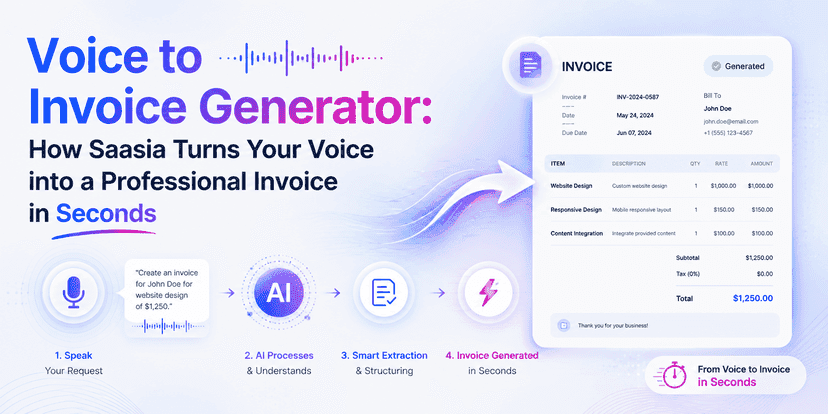
Speak → Understand → Structure → Review → Generate Invoice
The important part is the middle step.
Speech-to-text technology only converts audio into words.
A useful voice-to-invoice system must go further.
It needs to understand which words represent the following:
- The customer
- The item or service
- The quantity
- The price
- The billing instruction
That is what turns voice transcription into business automation.
How Is Voice to Invoice Different From Voice Typing?
Voice typing simply writes down what you say.
If you say:
“Ravi Traders, motor service, two units, ₹900 each.”
Basic dictation may only create one sentence.
A voice invoice system should understand the structure behind that sentence.
For example:
Customer: Ravi Traders
Service: Motor Service
Quantity: 2
Rate: ₹900
That distinction matters.
A voice-to-invoice generator is not meant to replace a keyboard with a microphone.
Its purpose is to reduce the steps needed to complete billing.
Why Is Voice-Based Invoicing Important for Businesses?
Because invoices are often created at the wrong time.
The best time to record billing details is usually when the transaction is still fresh.
But that may also be when the business owner is
- Standing with a customer
- Travelling
- Inspecting equipment
- Managing staff
- Completing another job
- Working from a mobile phone
Traditional invoice software assumes the user has time to sit down and type.
Many business owners do not.
Voice changes that interaction.
Instead of adapting the business workflow to accounting software, the software starts adapting to the way the owner already works.
Why Does Faster Invoice Creation Matter?
An invoice that has not been created cannot be paid.
That sounds obvious, but billing delays are still a real operational issue.
Late payments and accounts receivable continue to create cash-flow pressure for businesses in many markets. Recent reporting has also highlighted that manual invoice processing remains a major challenge for many Indian SMEs despite wider digital adoption.
A voice-to-invoice workflow cannot force customers to pay faster.
But it can address one problem that the business directly controls:
How quickly and accurately the invoice gets created.
That is a useful distinction.
Who Can Use a Voice-to-Invoice Generator?
Voice invoicing is not limited to one industry.
It can be particularly useful wherever billing happens immediately after a product, service, visit, or job.
Examples include:
Service businesses
- AC technicians
- Electricians
- Plumbers
- Appliance repair businesses
- Automobile workshops
- Machinery service companies
- Maintenance providers
Freelancers
- Designers
- Developers
- Consultants
- Photographers
- Trainers
- Marketing professionals
Small businesses
- Traders
- Distributors
- Local retailers
- Contractors
- Agencies
Field-based businesses
- Installation teams
- Service engineers
- Field technicians
- Inspection teams
- Sales representatives
The common factor is simple:
They know what needs to be billed, but manual data entry slows them down.
When Should a Business Use Voice to Invoice?
Voice invoicing is especially useful when:
- Invoices are repetitive
- Billing happens away from a desktop
- Owners create invoices themselves
- Staff spend time entering simple billing data
- Invoices are sometimes created hours or days after work is completed
- Mobile-first billing would be easier than form-based billing
It may be less suitable when an invoice contains dozens or hundreds of complex line items already stored in structured business systems.
In those cases, bulk or automated system-to-system invoicing may be more efficient.
The goal is not to use voice for everything.
It is to use voice where speaking is faster than typing.
Benefits
1. Create Invoices With Less Manual Typing
The most obvious benefit is speed of interaction.
Instead of navigating through multiple fields, a user can describe the transaction naturally.
For example:
“Invoice Green Tech Solutions for website maintenance, ₹12,000.”
That can reduce repetitive typing, especially for straightforward invoices.
The value becomes greater for users who create invoices from mobile devices.
2. Invoice Customers While the Job Is Still Fresh
Imagine an appliance technician completing five customer visits in one day.
With a traditional workflow:
Complete job → make a note → travel → complete next job → return → create invoices.
With voice invoicing:
Complete job → speak billing details → review invoice → continue.
The second workflow reduces the gap between completing work and recording the transaction.
That can also reduce reliance on memory or handwritten notes.
3. Make Mobile Billing More Practical
Entering data into small form fields on a phone is rarely enjoyable.
Voice creates another input method.
A business owner can potentially use the same mobile device already used for:
- Calls
- Customer communication
- Payments
- Business apps
to create an invoice.
This makes voice-to-invoice particularly relevant for mobile-first businesses.
4. Reduce Repetitive Administrative Work
Consider a business creating 20 invoices per day.
Even saving one minute per invoice would remove roughly 20 minutes of repetitive work each day.
Over 25 working days, that becomes more than eight hours.
This is an illustrative calculation rather than a guaranteed Saasia result, but it shows why small workflow improvements matter at scale.
The objective is not simply
“Create an invoice faster.”
It is:
Give business owners more time for customers, operations, and revenue-generating work.
5. Make Billing Easier for Non-Technical Users
Many business tools are built around forms, menus, settings, and accounting terminology.
That can create friction for owners who simply want to say what happened.
Voice interfaces can make the first interaction more natural.
Instead of thinking:
Which field should I fill first?
The owner can think:
What did I sell?
That is a significant UX shift.
6. Reduce the Delay Between Work and Billing
A common hidden problem in small businesses is not necessarily bad accounting.
It is postponed accounting.
Billing gets pushed to:
- The end of the day
- Tomorrow morning
- The weekend
- “When I have time”
A fast invoice creation method lowers that barrier.
The easier it is to generate the invoice, the more likely billing can become part of the transaction itself rather than a later administrative task.
Process (Step-by-Step)
Step 1: Start the Voice to Invoice Workflow
The user opens the invoice creation experience and chooses voice input.
The goal should be to reduce unnecessary setup. The user should be able to begin speaking with minimal navigation.
Step 2: Speak the Invoice Details Naturally
Instead of completing each field one by one, the user describes the invoice.
For example:
“Create an invoice for Kumar Electricals. Three ceiling fans at ₹2,400 each and installation charge ₹1,000.”
A business-focused system needs to identify the important entities inside that request.
Step 3: Convert Speech Into Text
Speech-recognition technology converts the spoken audio into text.
Modern speech platforms support real-time transcription, but no speech recognition system is perfectly accurate in every environment. Audio quality, pronunciation, domain terms, and background noise can affect results. This is why invoice review remains important.
Step 4: Identify the Billing Information
The next layer extracts meaning from the transcript.
From:
“Three ceiling fans at ₹2,400 each and installation charge ₹1,000.”
The system can identify fields such as
- Item: Ceiling fan
- Quantity: 3
- Rate: ₹2,400
- Service: Installation
- Rate: ₹1,000
This step is where AI adds more value than simple dictation.
Step 5: Structure the Invoice
The extracted information is placed into an invoice format.
The system can organise information into fields and line items so the user does not need to rebuild the spoken information manually.
Step 6: Review the Details
This step should never be skipped.
Before finalising the invoice, check:
- Customer
- Items
- Quantities
- Rates
- Totals
- Tax details where applicable
- Dates
- Payment terms
Voice makes input faster.
Review makes billing safer.
Step 7: Generate the Professional Invoice
Once the details are confirmed, the invoice can be generated in a professional format.
The result is a workflow that feels closer to the following:
Say it → check it → invoice it
Rather than
Open software → find fields → type everything → correct mistakes → create invoice.
That reduction in friction is the core value of Saasia's voice-to-invoice concept.
Challenges
Challenge 1: Background Noise
A technician may create an invoice from the following:
- A workshop
- A construction site
- A busy shop
- A roadside location
Noise can affect speech recognition.
Google's speech documentation explicitly notes that recognition accuracy varies by audio characteristics and operating conditions rather than having one universal accuracy score.
Best practice
When possible:
- Speak close to the microphone
- Reduce background noise
- Speak clearly
- Review key numbers before generating the invoice
Challenge 2: Customer and Product Names
Speech systems may struggle with the following:
- Local business names
- Brand names
- Technical terms
- Model numbers
- Abbreviations
For example:
“KPR Engineering”
could be interpreted incorrectly if spoken unclearly.
Best practice
The product workflow should make names and important fields easy to review and correct.
Challenge 3: Numbers Must Be Verified
Invoice errors involving:
- ₹1,500 vs ₹15,000
- Quantity 2 vs quantity 3
- Dates
- Tax values
can be more serious than spelling errors.
Best practice
Always display critical financial values clearly before final confirmation.
AI should accelerate invoice preparation.
It should not remove financial review.
Challenge 4: Users May Speak Incomplete Instructions
A user might say:
“Create an invoice for Kumar, AC service ₹1,500.”
But which Kumar?
What date?
Does tax apply?
Missing information must be handled gracefully.
Best practice
Ask only for missing required data instead of making the user repeat the entire invoice.
That keeps the experience conversational without sacrificing accuracy.
Challenge 5: Trying to Automate Every Invoice
Voice is useful, but it is not always the best input method.
If a business already has 5,000 structured transactions in an ERP, speaking them into an app would make no sense.
Voice works best where the information begins with a human.
Bulk imports, integrations, or automatic invoice generation work better where structured data already exists.
This distinction keeps automation practical.
How Should Businesses Measure Voice to Invoice Performance?
Do not measure success only by whether AI can recognise speech.
Measure the business workflow.
1. Invoice Creation Time
Track:
Average time from starting invoice creation to finalized invoice.
Compare manual entry with voice-assisted creation.
2. Correction Rate
Measure how many generated invoices require corrections.
Track common errors such as:
- Customer names
- Product names
- Quantities
- Prices
This helps identify where the voice workflow needs improvement.
3. Same-Day Invoice Rate
Measure the percentage of jobs invoiced on the same day they are completed.
For field-service businesses, this can be more meaningful than raw AI accuracy.
4. Administrative Time Saved
Suppose manual invoice creation takes four minutes and a voice-assisted workflow takes two.
For 500 invoices per month:
Manual: 2,000 minutes
Voice-assisted: 1,000 minutes
That equals about 16.7 hours saved per month.
Again, this is an example calculation, not a guaranteed Saasia benchmark.
Each business should measure its own workflow.
5. Invoice Error Rate
Speed without accuracy creates another problem.
Track:
Number of corrected invoices ÷ total invoices
A strong system should improve speed without increasing billing errors.
6. Adoption Rate
If staff have access to voice invoicing but continue using manual billing, something is wrong.
Measure:
- Voice invoices created
- Manual invoices created
- Repeat voice users
Good automation should be simple enough that users choose to use it.
What Results Should Businesses Expect?
The most realistic gains from a well-designed voice invoicing workflow are operational.
Businesses may be able to achieve the following:
- Less manual invoice entry
- Faster invoice preparation
- More immediate billing after service completion
- Better mobile invoicing workflows
- Less dependence on handwritten notes
- More time for customer-facing work
The exact improvement depends on invoice complexity, business type, speaking environment, and existing workflow.
Avoid treating a universal time-saving percentage as guaranteed.
Measure before and after.
That produces a far more useful ROI calculation.
Conclusion
For decades, invoicing software has asked business owners to behave like accounting software.
Open the form.
Select the customer.
Choose the item.
Enter the quantity.
Enter the rate.
Complete the fields.
But business owners do not naturally think in form fields.
They think:
“I serviced two AC units for this customer at ₹1,500 each.”
A voice-to-invoice generator turns that natural business language into a faster billing workflow.
That is what makes voice invoicing interesting.
The innovation is not the microphone.
It is the removal of unnecessary steps between the following:
work completed
and
invoice created.
With Saasia, the idea is simple:
Speak about the billing details. Let AI structure them. Review the information. Generate the invoice.
For freelancers, service teams, field workers, traders, consultants, contractors, and small businesses, that can turn invoicing from an end-of-day chore into something that happens while the transaction is still fresh.
The future of business software may not require users to learn more screens.
It may require software to understand more of what users already say.
FAQs
1. What is a voice-to-invoice generator?
A voice-to-invoice generator converts spoken billing information into structured invoice details, reducing the need to manually type every field.
2. How does voice-to-invoice work?
The system captures speech, converts it into text, identifies invoice information such as the customer, products, services, quantity, and price, and prepares the data for invoice generation.
3. Can I create an invoice just by speaking?
A voice-enabled invoicing workflow can allow you to provide the core billing details through speech. You should still review the invoice before finalizing it, especially names, quantities, prices, taxes, and totals.
4. Who should use a voice-to-invoice generator?
It is useful for freelancers, contractors, technicians, service businesses, traders, consultants, agencies, field teams, and other owners who frequently create straightforward invoices.
5. Is voice invoicing faster than manual invoicing?
It can be faster when the invoice information begins as something the user already knows and would otherwise have to type manually. The exact time saved depends on invoice complexity and the user's existing process.
6. Is a voice-generated invoice accurate?
Accuracy depends on speech recognition, audio quality, pronunciation, terminology, and the system's information extraction. Critical invoice details should always be reviewed before finalisation.
7. Can voice-to-invoice work for service businesses?
Yes. Service businesses are a strong use case because invoices are often created immediately after jobs, installations, repairs, consultations, or maintenance work.
8. What is the difference between speech-to-text and voice-to-invoice?
Speech-to-text produces a transcript.
Voice-to-invoice takes the next step by identifying billing information and placing it into invoice fields and line items.
9. Can voice invoicing help small businesses?
It can reduce repetitive data entry and make invoice creation easier from mobile devices, especially for owners who handle both operations and administration.
10. Why use Saasia for voice invoicing?
Saasia's voice-to-invoice concept is designed to simplify the path from spoken billing details to a professional invoice, helping business owners spend less effort on repetitive invoice entry and more time running their business.
Stop Typing Every Invoice. Start Speaking It.
You already know:
- Who the customer is
- What you sold
- What service you completed
- How much it costs
Why should entering that information into billing software become another job?
With Saasia's Voice to Invoice Generator, the goal is to make invoice creation feel natural:
Speak → Review → Generate.
Whether you run a service company, work independently, manage a small business, or spend most of your day away from a desk, Saasia can help simplify the way you create invoices.
Turn your voice into a professional invoice in seconds.
Explore Saasia's voice to invoice experience and discover a faster way to handle everyday billing.