AI Review Reply Generator
 Karuna
A customer leaves a review at 8:30 PM.
You see it the next morning.
You tell yourself:
“I’ll reply after I finish today’s work.”
Then calls begin.
Customers arrive.
Staff need help.
By the end of the day, the review is still unanswered.
Now imagine this happening across 10, 50, or 100 reviews every month.
That is the real review-management problem for many businesses.
It is not that owners do not care about customers.
It is that replying to every review takes time, attention, and consistency.
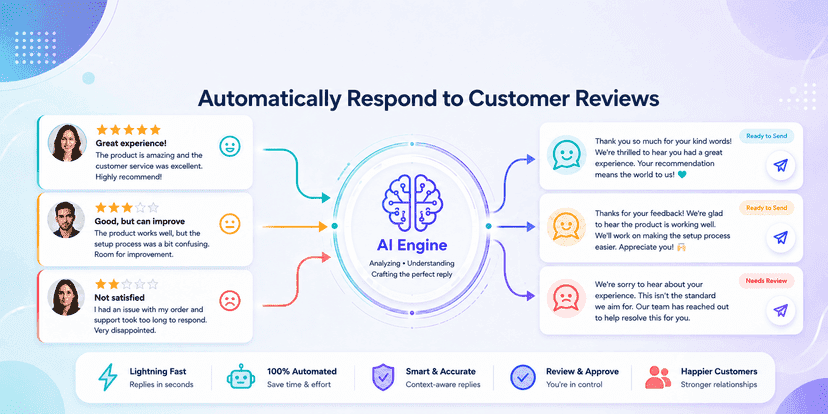
An AI review reply generator solves that problem by helping businesses create relevant responses to customer reviews automatically or with human approval.
Instead of typing every response from scratch, the system can:
- Read the review
- Understand the sentiment
- Identify the main topic
- Draft a response
- Adjust tone
- Flag sensitive reviews
- Prepare replies at scale
Google itself states that replying to reviews helps show customers that a business values their feedback. Google also notifies reviewers when a business replies, and customers can edit their review after seeing that response.
Google has also started integrating AI into business profile management through Gemini, including the ability to draft replies and summarise review themes for eligible profiles.
That tells us something important.
Review response is becoming a workflow that AI can assist with, not just a manual marketing task.
This guide explains:
- What automatic review reply software is
- Why businesses should respond to reviews
- How AI-generated review replies work
- How to automate review responses safely
- Which reviews should still involve humans
- What metrics businesses should track
- How to avoid robotic or risky replies
- How to build a practical review automation workflow
What Is an AI Review Reply Generator?
An AI review response tool is software that reads a customer review and creates a suggested reply based on the content, rating, sentiment, and business context.
For example, a customer might write:
“The service was fast, but I had to wait 20 minutes before someone spoke to me.”
A weak automated response might say:
“Thank you for your feedback.”
A better AI-assisted response could say:
“Thank you for sharing your experience. We’re glad the service itself was quick, and we appreciate your patience during the initial wait. We’ll use your feedback to improve how quickly customers are attended to.”
The second reply shows that the system understood both the positive and negative parts of the review.
That is the difference between basic auto-response rules and AI-generated review replies.
What Does 'Automatic Review Reply' Mean?
An automatic review reply workflow can work in different ways.
Fully manual
The business reads every review and writes every response.
AI-assisted
AI drafts the response, but a person reviews and publishes it.
Rule-based automation
The system automatically responds to simple reviews based on predefined templates.
AI automation
The system analyses the review and prepares or publishes a personalised response based on business rules.
The safest setup for many businesses is not full automation.
It is smart automation.
For example:
5-star simple review → auto reply
4-star review with feedback → AI draft
1-star complaint → human review required
This gives businesses speed without losing control.
Why Is Responding to Reviews Important?
Because a review is not only a conversation between your business and one customer.
It is public.
Future customers can read both:
- The review
- Your response
Google explicitly says helpful and positive replies can show that a business is responsive to its customers.
Consumer research also shows that people use reviews to judge businesses and increasingly look for detailed, current information rather than star ratings alone. BrightLocal's 2025 and 2026 review research highlights the continuing importance of reviews in local purchase decisions and the rising expectations consumers place on review quality and recency.
That means a response is not only customer service.
It is part of your public reputation.
Why Should Businesses Respond Faster?
A delayed response can make the business look inactive.
A fast response can show attention.
ReviewTrackers has reported that many consumers expect businesses to respond to negative reviews within days, with a significant share expecting a response within a week.
The practical lesson is simple:
If review replies depend entirely on the owner remembering to respond, some reviews will be missed.
Automation reduces that risk.
Who Needs Review Reply Automation Software?
An AI review management tool can be useful for almost any business receiving regular online reviews.
Strong use cases include:
Local businesses
- Salons
- Gyms
- Car service centres
- Repair businesses
- Restaurants
- Cafes
Healthcare
- Clinics
- Dental practices
- Diagnostic centres
- Wellness businesses
Hospitality
- Hotels
- Resorts
- Travel businesses
- Homestays
Professional services
- Consultants
- Agencies
- Accountants
- Legal service providers
Multi-location businesses
- Retail chains
- Franchise businesses
- Clinics
- Restaurants
- Service centres
The more reviews a business receives, the more valuable automation becomes.
When Should You Respond to Reviews Automatically?
Not every review should be fully automated.
Good candidates include:
- Simple 5-star reviews
- Positive service feedback
- Generic thank-you reviews
- Repeat customer praise
- Short low-risk comments
Human review is better for:
- Legal threats
- Refund disputes
- Safety complaints
- Serious service failures
- Medical complaints
- Privacy issues
- Harassment
- Highly emotional reviews
The best system knows when not to automate.
Benefits
1. Save Time on Repetitive Replies
Imagine a business receiving 200 reviews per month.
If each manual response takes three minutes, that is:
600 minutes per month
or:
10 hours
If AI prepares most replies and a manager only reviews exceptions, the amount of manual effort can fall significantly.
The exact saving depends on review volume and workflow, but the principle is straightforward.
Automation removes repeated drafting work.
2. Respond More Consistently
Without a system, review responses depend on:
- Who is working
- How busy the day is
- Whether someone remembers
- The employee’s writing skill
- Their mood
This creates inconsistent customer experiences.
An automated customer review reply system can maintain:
- Brand tone
- Response structure
- Greeting style
- Escalation rules
- Professional language
Consistency becomes especially useful for multi-location businesses.
3. Respond Faster
A review does not need to wait until the manager has free time.
An AI system can draft the response immediately.
That means employees can review it when convenient instead of writing from zero.
For simple positive reviews, businesses may decide to publish automatically.
For complex reviews, AI can still reduce preparation time.
4. Personalise Replies at Scale
Templates save time.
But customers can tell when every response is:
“Thank you for your feedback. We appreciate your business.”
AI can make responses more specific.
For example:
Customer review:
“Great haircut. Priya was very friendly and explained what would suit me.”
AI response:
“Thank you for the kind words. We’re glad Priya helped you choose a style that worked well for you. We hope to see you again soon.”
This feels more human because it refers to the actual experience.
That is the goal of good AI-generated review replies.
5. Handle Positive and Negative Reviews Differently
A 5-star review and a 1-star complaint should not receive the same type of response.
An AI system can classify reviews by:
- Rating
- Sentiment
- Complaint type
- Urgency
- Topic
Then apply different rules.
For example:
Positive review
Tone:
Warm and appreciative.
Neutral review
Tone:
Helpful and open to improvement.
Negative review
Tone:
Calm, empathetic, non-defensive, and escalation-focused.
This improves consistency.
6. Help Multi-Location Business Scale Review Management
One owner can manually manage 10 reviews.
Managing thousands across multiple locations is very different.
An AI review management tool can help central teams:
- Monitor review volume
- Draft responses
- Route complaints
- Track response times
- Compare branches
- Identify repeating complaints
Google's newer Gemini Business Profile features also show that review data can be summarised into feedback themes, which supports this broader move from individual review handling to AI-assisted reputation analysis.
Process (Step-by-Step)
Step 1: Collect New Reviews
The system first needs access to the reviews a business receives.
Depending on the platform and integration, reviews may come from:
- Google Business Profile
- Industry review platforms
- Internal customer feedback systems
- Other supported sources
The tool should store or process:
- Rating
- Review text
- Date
- Location
- Reviewer information allowed by the platform
- Response status
Step 2: Analyse the Review
AI then examines the content.
The system can identify:
- Positive sentiment
- Negative sentiment
- Mixed feedback
- Product issue
- Staff feedback
- Waiting time complaint
- Pricing issue
- Quality complaint
- Praise
For example:
“Good food but delivery took too long.”
should not be classified as purely positive.
It contains both praise and criticism.
Step 3: Assign a Risk Level
This is one of the most important steps.
Reviews can be grouped into risk levels.
Low risk
- Positive feedback
- Generic praise
- Simple 5-star review
Medium risk
- Minor complaint
- Service delay
- Product dissatisfaction
High risk
- Legal threats
- Medical concerns
- Fraud allegations
- Safety incidents
- Data privacy complaints
Only low-risk responses should generally be considered for full automatic publishing.
Step 4: Generate the Reply
The AI prepares a response using:
- Review content
- Star rating
- Business tone
- Location
- Brand guidelines
- Response rules
The response should avoid sounding like a template.
A useful reply usually contains:
- Acknowledgement
- Specific reference to the feedback
- Appropriate response
- Next step if needed
Step 5: Review Sensitive Replies
Human approval should be required where reputational or legal risk is high.
For example:
Customer:
“Your staff charged me twice and nobody has refunded me.”
The AI should not invent an explanation.
A safer response might be drafted as:
“We’re sorry to hear about this billing issue. We’d like to investigate it directly. Please contact our team with your transaction details so we can review what happened.”
A staff member can then approve or edit it.
Step 6: Publish the Response
Once approved, the response is posted.
For Google Business Profile, replies are public once approved by Google, and the reviewer is notified. Google also notes that customers can change their review after seeing the business's response.
This makes the response part of the customer recovery process.
Step 7: Track Feedback Themes
Do not stop at replying.
Reviews contain business intelligence.
Track recurring topics such as:
- Slow service
- Staff behaviour
- Product quality
- Pricing
- Cleanliness
- Delivery
- Waiting time
If 30 customers mention the same problem, the business does not need a better reply.
It needs to fix the problem.
That is where an AI review management tool becomes more valuable than a simple reply generator.
Challenges
Challenge 1: Robotic Replies
The easiest way to damage review automation is to make every response look identical.
For example:
“Thank you for your feedback. We value your opinion.”
Repeated 100 times.
Best practice
Use the actual review content.
Reference specific details naturally.
Keep the language short.
Do not over-personalise.
Challenge 2: Automating Serious Complaints
A complaint involving:
- Health
- Safety
- Fraud
- Legal action
- Refund disputes
should not receive an uncontrolled AI response.
Best practice
Create escalation rules.
Let AI detect the issue.
Let a human decide the response.
Challenge 3: AI Inventing Facts
AI should never say:
“We have already refunded you.”
unless the system actually knows that the refund happened.
Best practice
Only allow the response generator to use verified information.
If the system does not know what happened, use neutral language.
Challenge 4: Over-Apologising
Not every review requires:
“We sincerely apologize.”
A 4-star customer mentioning a minor delay may only need acknowledgement.
Over-apologising can make small issues appear larger.
Best practice
Match the tone to the severity.
Challenge 5: Replying to Fake or Policy-Violating Reviews
Some reviews may violate platform rules.
Google allows businesses to flag reviews that violate its content policies.
Best practice
Do not automatically argue with suspicious reviews.
Flag them for review and handle them according to platform policy.
What Should You Measure?
Review automation should be measured as an operational and customer-experience workflow.
1. Review Response Rate
Formula:
Reviews answered ÷ total reviews
Example:
100 reviews received
92 answered
Response rate:
92%
2. Average Response Time
Measure:
Time from review posted → business response
Compare before and after automation.
If reviews previously waited three days and now receive responses within hours, the workflow has improved.
3. Manual Time Saved
Example:
300 reviews per month.
Manual response time:
3 minutes each.
Total:
900 minutes = 15 hours
If AI drafts most replies and approval takes 45 seconds each:
225 minutes = 3.75 hours
Illustrative time saved:
11.25 hours per month
This is an example calculation, not a universal benchmark.
4. Escalation Rate
Track:
Percentage of reviews sent to human staff.
A good system should automate repetitive low-risk work while escalating important cases.
A 100% automation rate should not be the target.
The target should be safe automation.
5. Reply Edit Rate
Measure how often staff rewrite AI replies.
If 70% of responses need major editing, the tool needs improvement.
If only a small percentage need edits, automation is working effectively.
6. Review Sentiment Trends
Track whether customer feedback improves over time.
For example:
Month 1:
- 22% mention waiting time
Month 4:
- 8% mention waiting time
That is more valuable than generating a better apology.
The business solved the underlying problem.
What Results Can Businesses Expect?
A strong automated review reply workflow may help businesses achieve:
- Higher response coverage
- Faster response times
- Lower manual workload
- More consistent brand tone
- Faster escalation of complaints
- Better visibility into customer issues
It should not be positioned as a guaranteed way to increase star ratings.
The real goal is better review management.
Better reviews come from better customer experiences.
Conclusion
Customer reviews do not stop after someone clicks "Post".
That is where the business conversation begins.
Every public review gives you two opportunities:
- Respond to the customer.
- Show future customers how your business handles feedback.
The problem is scale.
A business owner may care deeply about every customer and still not have enough time to write hundreds of thoughtful responses.
That is where an AI review response tool creates value.
It can:
- Detect new reviews
- Understand customer sentiment
- Create personalised drafts
- Respond to simple reviews automatically
- Escalate serious complaints
- Keep brand tone consistent
- Identify recurring customer issues
But good review automation is not about removing humans.
It is about deciding where humans add the most value.
Do not spend employee time typing the same thank-you reply 100 times.
Do spend human attention on the customer who had a serious problem.
That is the difference between automation and intelligent automation.
The future of review management is not:
“AI replies to everything.”
It is:
AI handles repetition. Humans handle judgment.
That is how businesses can respond faster without sounding robotic.
FAQs
1. What is an automatic review reply?
An automatic review reply is a response to a customer review that is created or published automatically using predefined rules or AI.
2. What is an AI review response tool?
An AI review response tool analyses customer reviews and generates relevant reply suggestions based on the rating, sentiment, review content, and business tone.
3. Can AI respond to customer reviews automatically?
Yes. AI can generate and, where integrations allow, help automate responses. Businesses should still use human approval for sensitive, legal, medical, or high-risk complaints.
4. How do AI-generated review replies work?
The AI reads the review, identifies the sentiment and key topics, then generates a response based on the review and business guidelines.
5. Can I auto-reply to Google reviews?
Businesses can respond to Google reviews through verified business profiles. Google also supports AI-assisted review drafting through Gemini for eligible Business Profile users, although availability is being rolled out gradually.
6. Is review reply automation safe?
It can be safe when businesses use clear rules, human review for high-risk complaints, verified business data, and controlled automation.
7. Should I respond to positive reviews?
Yes. Responding to positive reviews shows appreciation and demonstrates that the business is active and responsive. Google specifically recommends helpful replies as a way to show customers that their feedback is valued.
8. Should negative reviews be answered automatically?
Not always.
Simple low-risk complaints can use AI-generated drafts, but serious complaints should be reviewed by a person before publishing.
9. Will automatic replies sound robotic?
They can if the system relies on generic templates.
A better AI review management tool should reference the actual review and vary the response naturally.
10. What is the best way to automate customer review replies?
Use a hybrid workflow:
- Collect reviews automatically.
- Analyse sentiment.
- Generate AI replies.
- Auto-publish low-risk replies.
- Send sensitive reviews for human approval.
- Track recurring customer issues.
This gives businesses both speed and control.
Stop Letting Customer Reviews Sit Unanswered
Your customers are already talking about your business.
The question is whether your business is responding.
An AI review reply generator can help you:
- Respond to reviews faster
- Reduce repetitive writing
- Maintain a consistent brand voice
- Handle positive reviews automatically
- Escalate serious complaints
- Track common customer feedback
- Save staff time
Instead of spending hours writing the same responses again and again, let AI handle the repetitive work while your team focuses on the reviews that actually need human attention.
Automate the reply. Keep the relationship human.
Explore an AI review management tool for your business and turn review responses from a forgotten task into a consistent customer experience.