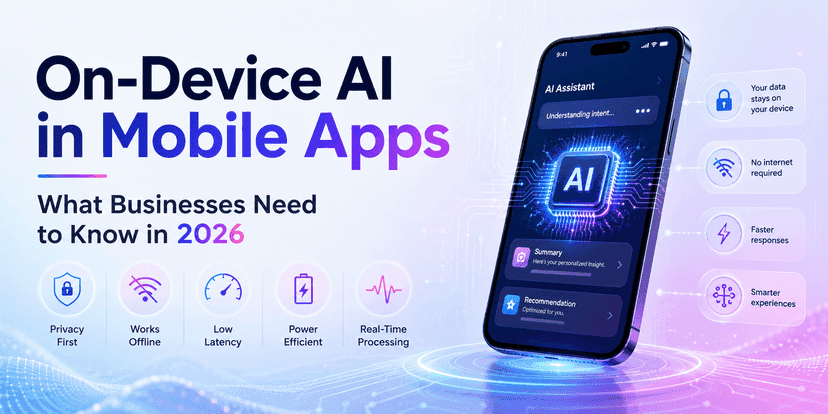
On-Device AI in Mobile Apps: What Businesses Need to Know in 2026
 Manikandan
A few years ago, most mobile AI features followed the same pattern.
The user did something in the app.
The app sent data to a cloud server.
The cloud ran the AI model.
Then the result came back to the phone.
In 2026, that is no longer the only practical option.
More AI work can now happen directly on smartphones.
That changes how businesses should think about privacy, speed, cloud cost, offline access, and mobile product design.
On-device AI in mobile apps means that an AI or machine learning model runs locally on the user’s phone instead of sending every request to a remote server.
For some use cases, this can mean:
- Faster responses
- Better privacy
- Offline features
- Lower cloud inference costs
- More personalized experiences
Apple now provides frameworks that let developers run AI models directly on Apple silicon, including its Core AI framework and Foundation Models capabilities. Apple says these approaches can keep user data private, maintain responsive apps, and avoid server-side token costs for local execution.
Google is moving in the same direction. Android supports on-device generative AI through Gemini Nano, ML Kit GenAI APIs, AICore, LiteRT-LM, and newer hybrid inference options that can route workloads between device and cloud.
But on-device AI is not automatically the right choice.
Phones still have limits.
Memory is limited.
Battery life matters.
Device hardware varies.
Models must often be smaller.
And some tasks still need cloud-scale intelligence.
The real question for a CEO or CTO is not:
“Should we move our AI to the phone?”
It is:
Which parts of our AI product should run on-device, which should run in the cloud, and how should the two work together?
This guide explains what businesses need to know about on-device AI in mobile applications in 2026.
You will learn:
- What on-device AI is
- Why it matters now
- Where it creates real business value
- How to design an on-device AI mobile application
- When cloud AI is still better
- What technical challenges to expect
- Which metrics matter
- Which use cases are practical today
What is on-device AI in mobile apps?
On-device AI means an AI model runs directly on the user’s smartphone, tablet, wearable, or other edge device.
Instead of sending every request to a cloud API, the mobile app can perform inference locally.
A simple flow looks like this:
User input → mobile app → local AI model → result
A cloud-first AI flow looks more like:
User input → internet → cloud API → model → internet → mobile app
The first approach removes the network from the main inference path.
That difference can be important.
What is the difference between on-device AI and cloud AI?
The core difference is where inference happens.
On-device AI
The model runs on the phone.
Best suited for:
- Privacy-sensitive tasks
- Low-latency features
- Offline use
- Repeated lightweight inference
- Personalisation
- Device-level automation
Cloud AI
The model runs on remote infrastructure.
Best suited for:
- Very large models
- Complex reasoning
- Heavy multimodal processing
- Large context windows
- Centralised data access
- Tasks requiring frequent model updates
Neither is universally better.
Many strong AI-powered mobile apps will use both.
What is hybrid AI in mobile applications?
Hybrid AI combines on-device and cloud AI.
The app decides where a request should run.
For example:
Run on-device:
- Intent detection
- Short summarisation
- Text rewriting
- Image classification
- Personalisation
Run in the cloud:
- Deep reasoning
- Large document analysis
- Enterprise search
- Complex agents
- Long-context conversations
Google’s 2026 Android AI updates include hybrid inference options that let developers prefer on-device, prefer cloud, or force one environment based on the use case.
This hybrid design is likely to become a major pattern in AI mobile app development.
Why is on-device AI important in 2026?
Because mobile hardware and AI frameworks are becoming capable enough to handle more useful workloads locally.
Android’s Gemini Nano can run generative AI tasks without requiring a network connection or sending prompts to a remote cloud service. Google highlights privacy, lower inference cost, and low latency as major advantages.
Apple has also expanded native AI development. Its 2026 machine learning tooling includes core AI, foundation models, local model execution, model optimization, and evaluation tools.
This matters because mobile AI can now move from
“interesting demo”
to:
“part of the product architecture.”
Who needs on-device AI mobile applications?
On-device AI is especially useful for businesses building apps where privacy, responsiveness, or offline access matters.
Examples include:
- Healthcare apps
- Fintech apps
- Field-service platforms
- Logistics apps
- Retail apps
- Voice assistants
- Camera-based products
- Productivity tools
- Enterprise mobile apps
- Travel apps
- Language tools
- Accessibility apps
The stronger the need for local data processing, the more attractive edge AI in mobile apps becomes.
When should you choose on-device AI?
Consider on-device AI when at least one of these is important:
- The feature must work offline.
- Sensitive data should remain on the phone.
- The app needs near-immediate responses.
- The same AI task runs many times per user.
- Cloud inference cost is becoming high.
- The feature relies on camera, audio, or device signals.
- User-specific personalization matters.
Do not choose it only because “on-device AI sounds modern."
Choose it when it improves the actual product.
Benefits
1. Lower latency
Network calls take time.
Even a fast cloud model can feel slow if the user has:
- Weak mobile data
- High network latency
- Poor regional connectivity
- Temporary packet loss
With on-device machine learning, the app can avoid that network round trip.
Google notes that on-device execution removes server-call latency, although actual inference speed still depends on the device hardware.
For an interactive mobile feature, that can create a major difference in perceived quality.
2. Better privacy
Some data should not leave the device unless necessary.
Examples include:
- Personal photos
- Voice recordings
- Health information
- Private notes
- Messages
- Device activity
On-device processing can reduce how much sensitive information is sent to external infrastructure.
Apple states that Core AI is designed to run models entirely on-device and keep user data private.
Google makes a similar point for Gemini Nano and AICore, where prompts can be processed locally rather than being sent to the cloud.
That does not remove every privacy obligation.
But it can reduce data exposure.
3. Offline AI features
A cloud-only AI app stops being intelligent when the network disappears.
An on-device app can continue working.
This is useful for:
- Warehouses
- Rural areas
- Flights
- Construction sites
- Factories
- Field service
- Travel
- Emergency situations
Imagine an inspection app used by technicians.
A worker photographs equipment.
The app identifies the machine.
It detects likely damage.
It suggests the next inspection step.
All without internet access.
That is a real business advantage.
4. Lower inference cost
Cloud AI usually creates costs every time the model runs.
Local inference shifts much of that compute to the user’s device.
Apple describes on-device Core AI execution as having zero server dependencies and zero token costs for local inference.
That can matter for high-frequency features.
Suppose your app performs AI inference 100 times per day for each active user.
At 100,000 users, that becomes 10 million inference events per day.
Moving even part of that workload onto the device may reduce cloud spend significantly.
5. More responsive personalisation
On-device AI can use local context without constantly uploading it.
For example, an app might personalize:
- Search ranking
- Recommendations
- Keyboard suggestions
- Content order
- Notifications
- User shortcuts
The model can react to the user quickly while keeping more context local.
That can improve both experience and privacy.
6. Better resilience
Cloud systems fail.
Networks fail.
APIs hit rate limits.
On-device AI can give the mobile product another path.
A hybrid app may use:
local model first → cloud fallback when needed
or:
cloud model first → local fallback when offline
That creates a more resilient architecture.
Process (Step-by-Step)
Step 1: Start with the use case.
Do not begin with:
“We want an on-device LLM.”
Begin with:
“We need this feature to work offline.”
or:
“We need to avoid sending voice recordings to our server.”
Define the problem first.
Then decide whether on-device AI solves it.
Step 2: Classify the AI workload
Ask what the model must do.
Common workloads include:
- Classification
- Object detection
- Speech recognition
- Summarisation
- Rewriting
- Intent detection
- Function calling
- Image understanding
- Text generation
Google’s ML Kit GenAI APIs currently support several on-device tasks through Gemini Nano, including prompting, summarisation, proofreading, rewriting, image description, and speech recognition.
This is a useful signal.
Not every feature needs a large general-purpose cloud model.
Step 3: Decide local, cloud, or hybrid.
Create a decision table.

Most serious products should evaluate hybrid architecture before choosing one side.
Step 4: Choose the model and framework.
For iOS, options now include Apple’s Core AI and Foundation Models ecosystem. Apple also provides optimisation tooling for model size and inference performance.
For Android, common options include:
- Gemini Nano
- ML Kit GenAI APIs
- AICore
- LiteRT-LM
- Custom optimised models
Google has also demonstrated small models such as FunctionGemma 270M running locally for function-calling use cases.
The right choice depends on:
- Hardware support
- Model size
- Accuracy
- Speed
- Memory
- Battery impact
- Distribution strategy
Step 5: Compress and optimise the model.
A model that runs on a server may not fit comfortably on a phone.
Common techniques include:
- Quantisation
- Distillation
- Pruning
- Palettisation
- Smaller architecture
- Reduced context size
Apple’s Core AI optimisation tooling specifically supports techniques such as quantisation and palettisation to reduce model size and improve inference performance with limited accuracy loss.
Optimisation is always a trade-off.
Smaller models usually mean:
- Faster inference
- Lower memory
- Lower battery use
But possibly lower quality.
You need to test the exact feature.
Step 6: Design device capability checks
Not every customer has the same phone.
This is one of the biggest product issues in on-device AI mobile app development.
Your application should know:
- Device model
- Operating system
- Available memory
- AI framework support
- Model availability
Then provide fallback behaviour.
For example:
Supported device → local AI
Unsupported device → cloud AI
Do not simply show an error.
Step 7: Design around battery and heat
Fast AI is useless if it drains the phone.
Measure:
- CPU use
- GPU/NPU use
- Memory
- Thermal impact
- Battery consumption
A feature that runs once per day has very different constraints from one that runs continuously.
Step 8: Build privacy boundaries
On-device does not automatically mean secure.
Ask:
- Where is model input stored?
- Are outputs logged?
- Does analytics collect the prompt?
- Can another app access local files?
- Does fallback send data to the cloud?
Document the full data path.
This is especially important in healthcare, finance, HR, and enterprise apps.
Step 9: Test on real hardware
Do not test only on your newest flagship phone.
Create a device matrix.
Test:
- High-end phones
- Mid-range phones
- Older supported devices
- Low battery
- Low storage
- Background state
- Thermal stress
- Weak network
- Offline mode
On-device AI performance can vary significantly across hardware.
Step 10: Build evaluation and fallback logic
A local model may be good enough for 90% of simple requests.
That does not mean it should handle the other 10%.
Use confidence or rules where practical.
Example:
Simple request → local
Uncertain result → cloud
High-risk action → human approval
This is often better than forcing every task onto the device.
Challenges
Challenge 1: Device fragmentation
Android devices vary widely.
Even iPhones vary by generation and available capabilities.
Your app may not be able to run the same model everywhere.
Best practice: Build capability detection and fallback into the architecture from day one.
Challenge 2: Model size
Generative models can be large.
Large models consume:
- Storage
- RAM
- Bandwidth
- Battery
Use smaller models where possible.
Google’s FunctionGemma example is built around a 270 million parameter model designed to be efficient enough for mobile execution after task-specific tuning.
That illustrates an important rule:
A specialized small model can be more useful than a general large model for a narrow mobile task.
Challenge 3: Accuracy trade-offs
The strongest cloud model may outperform a small local model.
Do not hide that difference.
Instead, design around it.
Use local models for tasks they handle well.
Escalate complex tasks.
Challenge 4: Battery and thermal limits
Phones are not data centers.
Heavy continuous influence can increase the following:
- Battery drain
- Heat
- App slowdown
Test real usage, not isolated benchmarks.
Challenge 5: Model updates
Cloud models can be updated centrally.
Local models may require:
- OS updates
- App updates
- Model downloads
- Version compatibility
System-managed approaches can reduce some of this burden. Android’s AICore, for example, handles access to Gemini Nano and manages model availability at the system level.
Challenge 6: Assuming on-device means zero cost
Local inference can reduce cloud inference costs.
But you still pay for:
- Mobile engineering
- Testing
- Optimisation
- Model updates
- QA
- Device compatibility
- Monitoring
- Cloud fallback
The right question is not:
“Is on-device free?”
It is:
“Does on-device improve our total cost per successful user outcome?”
What should businesses measure?
A good mobile app AI development program should track product, model, and device metrics.
Performance metrics
- Time to first result
- Total inference latency
- P50 latency
- P95 latency
- App launch impact
Model metrics
- Accuracy
- Task completion rate
- Confidence
- Hallucination rate
- Cloud escalation rate
Device metrics
- Memory use
- CPU/GPU/NPU use
- Battery impact
- Thermal impact
- Model size
Business metrics
- Cloud cost avoided
- Cost per AI action
- Feature adoption
- Session completion
- Offline task completion
- Conversion rate
What latency should you target?
There is no single target.
For some features:
<100 ms may feel instant.
For a more complex local generative task:
1–3 seconds may still feel good.
For longer generation,
Streaming can improve perceived speed.
The useful metric is:
time to useful output
not simply model runtime.
How much cloud cost can on-device AI reduce?
That depends on how much work moves locally.
A simple model:
If 60% of your AI requests can run on-device, then only 40% need cloud inference.
That does not automatically mean a 60% total infrastructure saving, because your backend still has other costs.
But cloud model spending for that workflow can fall sharply.
This is why high-frequency, lightweight AI tasks are strong candidates for local execution.
What result should businesses expect?
A well-designed on-device AI feature may create the following:
- Faster perceived response time
- Lower cloud AI usage
- Better offline completion rates
- Less sensitive data sent to servers
- Better product resilience
- More personalised mobile experiences
The exact result depends on the use case and supported hardware.
There is no universal benchmark.
The starting architecture matters.
Conclusion
On-device AI in mobile apps is becoming a practical architecture choice, not just an experimental feature.
Apple and Google are both investing heavily in local AI frameworks, optimized mobile models, and hybrid inference.
That creates new opportunities for businesses.
You can build mobile features that are
- Faster
- More private
- Offline-capable
- Less dependent on cloud inference
- More resilient
But not every AI feature belongs on the phone.
Large reasoning tasks may still need the cloud.
Enterprise knowledge may still live centrally.
Older devices may need fallback paths.
The best architecture in 2026 is often hybrid.
Run simple, private, repeated work locally.
Run complex or heavy work in the cloud.
Keep business logic deterministic where possible.
Measure the user outcome.
That is how businesses should approach AI in mobile apps.
Not as a race to put the largest possible model onto a phone.
But as a way to put intelligence in the right place.
FAQs
1. What is on-device AI in mobile apps?
On-device AI means an AI or machine learning model runs directly on the user’s phone rather than sending every request to a cloud server.
It can improve privacy, offline access, speed, and cloud cost efficiency.
2. How does on-device AI work in mobile apps?
The app loads or accesses a model available on the device.
User input is processed locally.
The device’s CPU, GPU, or dedicated AI hardware performs inference and returns the result to the application.
3. What are the benefits of on-device AI for mobile apps?
The main advantages include the following:
- Lower latency
- Better privacy
- Offline functionality
- Lower cloud inference usage
- Better personalisation
- Greater resilience
4. What is on-device AI vs. cloud AI for mobile apps?
On-device AI runs locally on the phone.
Cloud AI sends requests to remote servers.
On-device is strong for privacy, speed, and offline work.
Cloud AI is stronger for large models, complex reasoning, and large-scale data access.
5. How do you develop an on-device AI mobile application?
The usual process is:
- Define the use case.
- Select local, cloud, or hybrid architecture.
- Choose a model.
- Optimize the model.
- Integrate it into iOS or Android.
- Test device compatibility.
- Measure latency, memory, battery, and accuracy.
- Add cloud fallback where needed.
6. How do you implement on-device AI in mobile apps?
Developers can use platform frameworks such as Apple’s Core AI and Foundation Models technologies or Android’s Gemini Nano, AICore, ML Kit GenAI, and LiteRT-LM, depending on the feature and platform.
7. What are common on-device AI use cases in mobile applications?
Common use cases include:
- Summarisation
- Text rewriting
- Image classification
- Speech recognition
- Intent detection
- Recommendations
- Smart search
- Offline assistants
- Camera intelligence
- Function calling
8. What businesses benefit most from on-device AI applications?
Businesses in healthcare, finance, retail, logistics, field service, travel, productivity, enterprise software, and consumer mobile products may benefit when privacy, speed, or offline access matters.
9. What are the advantages of on-device AI in mobile apps for privacy?
Sensitive input can remain on the phone instead of being sent to a remote AI server for every request.
This can reduce data exposure, though businesses still need secure local storage, logging rules, permissions, and clear cloud fallback policies.
10. Is on-device AI better than cloud AI in 2026?
Not always.
On-device AI is better for certain private, lightweight, low-latency, and offline tasks.
Cloud AI is better for many complex or compute-heavy tasks.
For many products, a hybrid architecture provides the best balance.
Planning an AI-Powered Mobile App in 2026?
The most important decision may not be which AI model you use.
It may be where the model runs.
Poor architecture can create the following:
- Slow mobile experiences
- High cloud bills
- Privacy concerns
- Device compatibility problems
- Battery drain
- Scaling problems
InfiniAppsAI helps businesses design and build AI-powered mobile applications with the right mix of on-device, edge, and cloud AI.
Our AI mobile app development services can help with:
- On-device AI architecture
- AI-powered mobile apps
- iOS AI development
- Android AI development
- Hybrid AI architecture
- Edge AI in mobile apps
- On-device machine learning
- Model optimisation
- Mobile AI integration
- Cloud fallback architecture
If you are deciding whether your next AI feature should run on the phone, in the cloud, or both, start with the architecture before you start coding.
Book a consultation with InfiniAppsAI to plan a secure, scalable, and cost-efficient AI mobile application.