How to Deploy an AI Agent to Production
 Sasikumar
Building an AI agent is now easier than before.
You can connect an AI model, add a prompt, link a few tools, and create a working demo in a short time.
But a demo is not a production system.
A production AI agent must work with real users and real business data. It must stay secure. It must handle errors. It must work when many people use it at the same time.
It also needs logging, monitoring, access control, testing, and cost tracking.
This is where AI agent deployment becomes important.
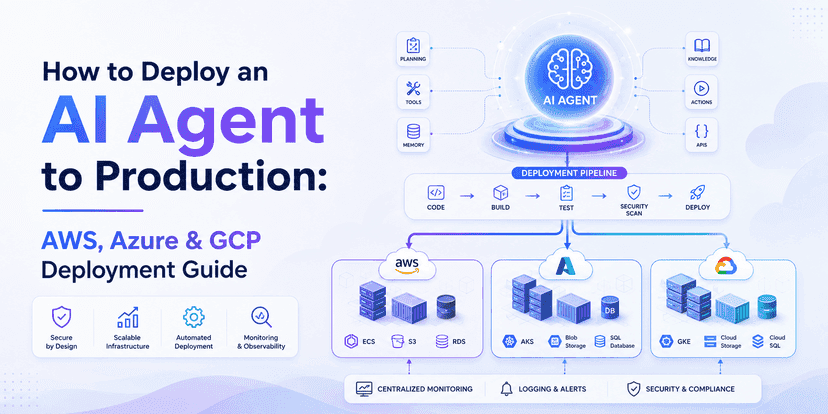
To deploy an AI agent to production, you need to prepare the agent, select the right cloud setup, secure its access, connect its tools, test it, and monitor it after launch.
AWS, Microsoft Azure, and Google Cloud Platform offer tools for this work.
AWS provides Amazon Bedrock AgentCore.
Microsoft provides Foundry Agent Service.
Google Cloud provides Vertex AI Agent Engine.
Each platform has a different cloud ecosystem. But the main production needs are very similar.
In this guide, you will learn:
- What production AI agent deployment means
- How production AI agent architecture works
- How to deploy an AI agent on AWS
- How to deploy an AI agent on Azure
- How to deploy an AI agent on GCP
- How to secure an AI agent
- How to monitor an AI agent
- How to test an agent before launch
- How to choose between AWS, Azure, and GCP
- Common AI agent deployment mistakes
The goal is simple.
You should not only build an AI agent that works.
You should build an AI agent that keeps working when real people depend on it.
What Does It Mean to Deploy an AI Agent to Production?
AI agent deployment means moving your agent from a test setup into a live environment.
In production, the agent can serve real users.
It may also connect to real business systems.
For example, it may read customer data, search a CRM, create a ticket, send an email, update a record, or start a workflow.
A basic AI agent may look like this:
User → Prompt → AI Model → Response
This may be enough for testing.
A production AI agent is more complex.
It may look like this:
User → App → API → Agent → AI Model → Tools → Data → Response
Many other systems work around this flow.
These can include:
- User login
- Access control
- Secrets
- Databases
- Agent memory
- Logging
- Tracing
- Monitoring
- Error handling
- Rate limits
- AI evaluation
- CI/CD
- Security controls
- Cost tracking
This is why production deployment needs proper planning.
Your agent may work well on a developer's laptop.
But that does not mean it is ready for customers.
A real production system must handle more traffic, more data, more errors, and more security risks.
AI Agent Production Architecture
Before you choose AWS, Azure, or GCP, you should understand the basic architecture.
A common production flow looks like this:

1. User Layer
This is where the user starts.
It may be:
- A website
- A mobile app
- A chatbot
- An internal dashboard
- A customer portal
- A messaging app
The user sends a request to the system.
2. Application and API Layer
The application receives the request.
The API may check the user before passing the request to the agent.
This layer can also manage:
- Authentication
- Rate limits
- Sessions
- Request validation
- API security
3. Agent Runtime
The runtime is where the agent works.
The agent may:
- Understand the request
- Choose a tool
- Call an AI model
- Read memory
- Use an API
- Build a response
- Complete a task
The runtime must be stable because it controls much of the agent workflow.
4. AI Model Layer
The agent may use one or more models.
These may include:
- Large language models
- Vision models
- Speech models
- Embedding models
- Other AI models
Some systems may use different models for different tasks.
5. Tools and Business Systems
Tools allow an AI agent to take action.
An agent may connect with:
- CRM systems
- ERP systems
- Databases
- Search tools
- Email systems
- Calendar tools
- Payment APIs
- Internal APIs
- MCP tools
Each tool should have clear limits.
The agent should only get the access it truly needs.
How to Deploy an AI Agent to Production
Moving an AI agent into production should be a clear process.
A useful flow is:
Build → Package → Secure → Test → Deploy → Monitor → Evaluate → Scale
Let us go through each step.
Step 1: Prepare and Package Your AI Agent
Start by making your application easy to repeat.
Another developer or deployment system should be able to run the same version.
Your package may include:
- Agent code
- Libraries
- Model settings
- Tool settings
- Configuration files
- Runtime settings
- Environment variables
- Version details
Docker is often used for this.
A Docker container gives the application a fixed environment.
This can reduce the difference between development, staging, and production.
But Docker is not always required.
Some managed AI agent platforms can run your code without you managing every part of the hosting system.
The main goal is consistency.
Your production version should not depend on hidden settings from one developer's computer.
Step 2: Separate Development, Staging, and Production
Do not use one environment for everything.
A better setup is:

Development
Developers build and test new features here.
It may use test data and test services.
Staging
Staging should be close to your real production setup.
Use it to test new versions before users see them.
Production
This is the live environment.
Real users and real business processes may depend on it.
Each environment should have its own settings.
Do not share important production secrets with development systems.
Step 3: Secure Environment Variables and Secrets
An AI agent may need many private values.
Examples include:
- Model API keys
- Database passwords
- OAuth keys
- Cloud credentials
- Third-party API keys
- Encryption keys
Do not put these values directly inside your source code.
Do not place them inside prompts.
Do not print them in logs.
Use a secure secrets system.
Also make sure each environment has separate credentials.
For example, staging should not use the same database password as production.
This helps reduce risk.
Step 4: Choose the Right Runtime
The runtime is where your agent runs.
There are many choices.
You may use:
- Serverless services
- Containers
- Kubernetes
- Virtual machines
- Cloud Run
- Managed agent services
- Other cloud runtimes
Do not choose a complex setup just because it looks powerful.
Choose based on your real needs.
Ask questions such as:
- How many users will use the agent?
- How long can one task run?
- Does the agent need memory?
- Does it need GPU access?
- Does it need private networking?
- How much traffic do we expect?
- Do we have compliance rules?
- Which framework are we using?
Start with the simplest setup that can meet your needs.
You can improve the architecture as your traffic grows.
Step 5: Connect the AI Model
The agent needs access to an AI model.
The model may handle:
- Text
- Images
- Audio
- Search
- Classification
- Summaries
- Reasoning
- Data extraction
Avoid making every part of your system depend directly on one model provider when you need flexibility.
A useful structure is:
Agent Logic → Model Interface → Model Provider
This adds a layer between your application and the model.
Later, you may be able to change models with less work.
It may also help when one task needs a small model and another task needs a larger model.
Step 6: Connect Tools and APIs
AI agents become more useful when they can do more than answer questions.
For example, a sales AI agent may:
- Search the CRM
- Find a customer
- Read account details
- Create a summary
- Suggest a next step
- Create a follow-up task
- Schedule a meeting
To do this, the agent needs tools.
These tools may connect with:
- Salesforce
- HubSpot
- ERP systems
- Databases
- Calendar
- Payment systems
- Search tools
- Internal software
- MCP servers
But tool access creates risk.
Do not give every agent full access.
If an agent only needs to read customer records, it should not get permission to delete them.
Use the least amount of access possible.
How to Deploy an AI Agent on AWS
AWS offers several ways to host AI applications.
One option for AI agents is Amazon Bedrock AgentCore.
AgentCore is designed to help teams move AI agents from a test stage into a production environment.
It can support areas such as:
- Runtime
- Identity
- Memory
- Tools
- Security
- Monitoring
A simple AWS agent flow can look like this:

AWS identity, security, and monitoring services support the system around this flow.
AWS Step 1: Test the Agent
Before deployment, make sure the agent works well in your local environment.
Test:
- AI model calls
- Tool calls
- Authentication
- Error handling
- Context
- Memory
- Expected results
Do not test only the happy path.
Also test what happens when a tool fails.
AWS Step 2: Set Up AgentCore
AgentCore can act as the runtime for a production agent.
You can connect your agent logic with the AWS environment.
The exact setup will depend on your architecture and framework.
Your goal is to create a stable place where the agent can run safely.
AWS Step 3: Configure IAM Permissions
AWS IAM controls access.
Use it carefully.
Your agent should only receive the permissions needed for its job.
For example:

The same agent may not need permission to:
- Delete records
- Change user roles
- Change cloud settings
- Access unrelated databases
This follows the principle of least privilege.
AWS Step 4: Add Monitoring
You need to know what your agent is doing.
Monitor areas such as:
- Request time
- Errors
- AI model calls
- Tool calls
- Token use
- Cost
- Failed tasks
- Agent activity
AWS can use services such as CloudWatch and OpenTelemetry-based tracing for this work.
Logs tell you what happened.
Tracing helps you understand the full path of one request.
This is useful when one user request causes several model and tool calls.
AWS Production Checklist
Before launch, check:
- Runtime is ready
- IAM roles are correct
- Secrets are secure
- Tool access is limited
- Logs are enabled
- Tracing is enabled
- Errors are handled
- Agent tests are complete
- Scale testing is complete
- Cost tracking is enabled
How to Deploy an AI Agent on Azure
Microsoft provides Foundry Agent Service for building and running AI agents.
It supports different ways to build an agent.
This may include prompt-based agents and code-based agents.
A simple Azure architecture can look like this:

Microsoft Entra identity, Azure networking, and monitoring can support the deployment.
Azure Step 1: Build and Test
Start by testing your AI agent before deployment.
Check:
- Model output
- Tool calls
- Agent state
- Permissions
- Errors
- External systems
- Business rules
Try different user inputs.
Make sure the agent does not fail when the request is unclear.
Azure Step 2: Package the Agent
Azure-hosted agents can support custom code.
Depending on your setup, the application may be packaged as a container.
In some deployment paths, source code can also be used by the platform.
The main goal is the same.
You need a repeatable version that Azure can deploy and manage.
Azure Step 3: Configure Identity
Identity is very important.
An AI agent should not store long-term passwords inside its code.
Microsoft Entra identity can help an agent access approved Azure services.
This allows stronger control over what the agent can access.
Use separate roles where needed.
Review permissions often.
Azure Step 4: Configure Network Access
Some AI agents need to connect with private systems.
These may include:
- Private databases
- Internal APIs
- Business applications
- Virtual networks
- Private cloud resources
For these cases, network design is important.
Do not expose a private database to the public internet only because the AI agent needs to read it.
Use controlled network access.
Azure Step 5: Create a CI/CD Pipeline
Do not depend on manual deployment for a production system.
A basic CI/CD flow may be:
Code Update
   ↓
Build
   ↓
Tests
   ↓
Security Checks
   ↓
Deploy to Staging
   ↓
Smoke Test
   ↓
Deploy to Production
This makes deployments easier to repeat.
It also reduces human mistakes.
If a new version fails, your team should have a clear rollback plan.
How to Deploy an AI Agent on GCP
Google Cloud provides the Vertex AI Agent Engine for production AI agents.
It can help teams deploy and scale agent workloads without managing every part of the runtime.
A simple GCP architecture may look like this:
User
  ↓
Application
  ↓
Vertex AI Agent Engine
  ↓
Gemini or Another Model
  ↓
Tools and Data
  ↓
Business Systems
Google Cloud IAM, logging, and monitoring can support the agent.
GCP Step 1: Develop and Test
Build the agent and test it before launch.
Check:
- Accuracy
- Tool use
- Response time
- Error handling
- Context
- Security
- Expected actions
Testing should include both normal and unusual requests.
GCP Step 2: Select the Runtime
Choose the runtime based on your needs.
Think about:
- Framework
- Traffic
- Scaling
- Task length
- Network access
- Cost
A managed service may reduce infrastructure work.
A container-based setup may give you more control.
Choose the option that fits your team and product.
GCP Step 3: Configure IAM
Google Cloud IAM controls access to cloud resources.
Follow the least privilege rule.
For example:
Agent
  ↓
Read Customer Data
  ↓
Call Approved API
  ↓
Create Report
The agent should not get broad admin access unless it truly needs it.
Most agents do not need full cloud permissions.
GCP Step 4: Add Monitoring
Monitor areas such as:
- Request speed
- Errors
- Agent traces
- AI model use
- Tool calls
- Cost
- Failed tasks
Do not wait until a production problem happens.
Add monitoring while you build the deployment architecture.
AWS vs Azure vs GCP for AI Agents
There is no single best cloud for every AI agent.
The right choice depends on your business.
Here is a simple comparison.

Choose AWS When
AWS may be a good choice when:
- Your applications already run on AWS
- Your data is on AWS
- Your team knows AWS IAM
- You use Amazon Bedrock
- You already use AWS tools
Using the same cloud can reduce extra integration work.
Choose Azure When
Azure may be a good choice when:
- Your company uses Microsoft products
- Your team uses Azure
- You use Microsoft Entra ID
- Your apps already run on Azure
- You need close links with Microsoft systems
Many large businesses already have Microsoft identity and network systems.
In this case, Azure may fit the current setup well.
Choose GCP When
GCP may be a strong option when:
- Your team already uses Google Cloud
- You use Vertex AI
- You work with Gemini
- Your team has strong AI or ML skills
- Your data and applications are already on GCP
The cloud that matches your current systems is often the easiest choice.
AI Agent Security in Production
Security is one of the most important parts of AI agent deployment.
An AI agent may do much more than create text.
It may:
- Read private data
- Call an API
- Update a database
- Send messages
- Start a workflow
- Create a file
- Trigger a business action
This means poor security can create serious problems.
Authentication
Authentication answers this question:
Who is the user?
Your system should confirm the user's identity before giving access to protected features.
Authorisation
Authorisation answers another question:
What can this user or agent do?
Two users may use the same agent but have different access.
For example, a manager may see more business data than a normal employee.
Use Least Privilege
Give the agent only the permissions it needs.
Do not give broad access just because it is easier during development.
Smaller permission sets reduce risk.
Secure Your Secrets
Never show secret values in:
- Source code
- Prompts
- Logs
- Error messages
- Frontend code
Use a secure secrets service.
Change important credentials when needed.
Control Tool Access
Every agent tool should have rules.
For example, an AI agent may be allowed to create a draft email.
It may not be allowed to send that email without approval.
Tool rules can help reduce unwanted actions.
Use Human Approval for High-Risk Tasks
Some actions should not be fully automatic.
Human approval can be useful for:
- Sending money
- Deleting data
- Changing user access
- Sending sensitive messages
- Making large business changes
AI can prepare the action.
A person can approve it before it happens.
How to Monitor an AI Agent in Production
Deployment is not the end of the project.
After the AI agent goes live, you need to know how it performs.
Ask four basic questions:
Is the agent working?
Is the answer correct?
Is the system safe?
Is the cost under control?
Important metrics may include:

Good monitoring helps your team find problems early.
AI Agent Evaluation Before Production
Normal software tests are not enough for an AI agent.
Traditional software often has a fixed result.
AI output can change.
That means you must test agent behaviour too.
Create a test set with different types of requests.
Include:
- Normal requests
- Unclear requests
- Invalid requests
- Difficult requests
- Sensitive requests
- Tool failures
- API failures
- Long conversations
- Edge cases
Then check key areas.
Task Completion
Did the agent complete the correct task?
A good-looking answer is not enough if the actual task failed.
Accuracy
Was the answer correct?
Did the agent use the right business data?
Tool Selection
Did the agent choose the correct tool?
If several tools are available, this is very important.
Safety
Did the agent avoid actions it was not allowed to take?
Consistency
Does the agent behave well when you repeat similar requests?
Cost
How much does one successful task cost?
This can be a useful way to understand the real cost of the system.
AI Agent Production Readiness Checklist
Before launching your AI agent, check the following:
- The agent works well in staging
- Production model settings are tested
- Secrets are stored safely
- IAM or RBAC is configured
- Tool access is limited
- Database access is controlled
- Logging is enabled
- Tracing is enabled
- Agent evaluation is complete
- Rate limits are set
- Error handling is ready
- Retry rules are configured
- Cost monitoring is enabled
- Security testing is complete
- Rollback plan is ready
- Human approval is added for risky actions
- CI/CD is ready
- Production alerts are enabled
Do not treat this as a one-time list.
Review it again when your agent changes.
Prototype vs Production AI Agent
A prototype and a production AI agent are very different.

Moving from prototype to production is not only a hosting task.
It is an engineering task.
Common AI Agent Deployment Mistakes
Many AI agent problems come from basic deployment mistakes.
Here are some of the most common ones.
1. Deploying a Prototype Directly
A working demo is not always safe for production.
Test it first.
Add proper security, monitoring, error handling, and access control.
2. Giving Too Much Access
Do not give the agent full access to every system.
Only provide what the agent needs.
This reduces security risk.
3. Ignoring Monitoring
If you cannot see what the agent is doing, fixing problems becomes hard.
Add logs and tracing before launch.
4. Testing Only Successful Requests
Real users do not always send perfect requests.
APIs can fail.
Models can return poor output.
Tools can become unavailable.
Test these cases too.
5. Ignoring AI Cost
Model calls cost money.
Tool calls, databases, storage, and cloud systems also add cost.
A useful agent can still become too expensive if one task makes too many calls.
Track the cost of one successful task.
Then estimate monthly usage.
6. Hard-Coding Cloud Services Everywhere
If every part of your agent depends directly on one cloud service, moving later can become harder.
Use clear interfaces where it makes sense.
For example:
Agent Logic
   ↓
Model Interface
   ↓
Tool Interface
   ↓
Cloud Runtime
This can make the system easier to change.
7. Treating AI Testing Like Normal Unit Testing
Unit tests are still useful.
But AI agents also need behaviour tests.
You need to test the full task.
Check whether the agent made the correct choice, used the correct tool, and completed the goal.
Frequently Asked Questions
How Do You Deploy an AI Agent to Production?
Start by preparing the agent and its configuration. Then choose a runtime. Connect the AI model, business tools, and data. Secure all access. Test the agent in staging. Add monitoring and evaluation. Finally, use a controlled deployment process to move the agent into production.
What Is the Best Cloud for AI Agent Deployment?
There is no single best cloud.
AWS may fit teams that already use AWS.
Azure may fit businesses that use Microsoft services.
GCP may fit teams that use Google Cloud, Vertex AI, or Google's AI tools.
Choose based on your current systems, security needs, skills, data, and cost.
Can an AI Agent Run on AWS, Azure, and GCP?
Yes.
An AI agent can run on different cloud platforms if the application is designed for them.
You can make this easier by separating the agent logic from the cloud runtime.
How Do You Secure an AI Agent?
Use:
- Authentication
- Authorisation
- Least-privilege access
- Secure secret storage
- Encryption
- Network controls
- Tool permissions
- Logs
- Monitoring
- Human approval for high-risk actions
Security should be part of the design from the start.
How Do You Monitor an AI Agent?
Track:
- Response time
- Errors
- Tool calls
- Model calls
- Token use
- Task completion
- Failed workflows
- Security events
- Cost
- Output quality
Use tracing when one task includes many steps.
How Much Does It Cost to Deploy an AI Agent?
There is no fixed price.
Cost can depend on:
- AI model usage
- Number of users
- Number of requests
- Tool calls
- Runtime time
- Database use
- Storage
- Network use
- Monitoring
- Cloud services
A useful method is to calculate the cost of one completed task first.
Then multiply it by your expected usage.
This gives you a clearer starting point.
Quick AI Agent Production Workflow
A simple production workflow is:
1. Define the use case.
Decide what the AI agent should do.
↓
2. Build the agent.
Create the core agent logic.
↓
3. Test the agent.
Test normal and difficult requests.
↓
4. Package the application
Prepare a repeatable version.
↓
5. Choose AWS, Azure, or GCP.
Select the cloud that fits your current systems.
↓
6. Connect models and tools
Give the agent access to the services it needs.
↓
7. Secure identity and permissions
Limit access and protect secrets.
↓
8. Deploy to staging
Test the production-like setup.
↓
9. Evaluate real workloads
Check accuracy, safety, speed, and cost.
↓
10. Add monitoring and tracing.
Make sure you can see what happens inside each workflow.
↓
11. Deploy to production
Release the tested version.
↓
12. Keep improving.
Review logs, results, failures, and costs.
Conclusion: Move Your AI Agent From Prototype to Production
Deploying an AI agent to production is not just about putting an AI model on a server.
A production agent needs several parts working together.
These include:
Runtime + AI Models + Tools + Data + Security + Monitoring + Evaluation + Scaling
AWS, Azure, and GCP all provide strong options for AI agent deployment.
But you do not need to choose a cloud only because it has the longest feature list.
Look at your current systems first.
If your company already uses AWS, AWS may be easier.
If your business already depends on Microsoft tools, Azure may fit better.
If your team uses Google Cloud, Vertex AI, or Gemini, GCP may be a natural choice.
The cloud matters.
But good production design matters more.
Your agent should have limited access.
Its secrets should stay secure.
Its actions should be logged.
Its output should be tested.
Its cost should be measured.
Its failures should be easy to find.
And risky actions should have extra controls.
A demo only needs to work once.
A production AI agent needs to work again and again for real users.
That is the main difference between an AI prototype and a real AI business system.
At Infiniapps.ai, we help businesses design and build AI agent solutions that connect with existing systems, automate workflows, use business data, and support real production needs.
If you are planning to move an AI agent from prototype to production, start with your architecture.
Then choose the cloud.
Build the system so it can be secure, tested, monitored, and improved over time.
An AI model gives your application intelligence. A strong production architecture turns that intelligence into a useful and reliable business system.
That is how you move from an AI demo to a production-ready AI agent.