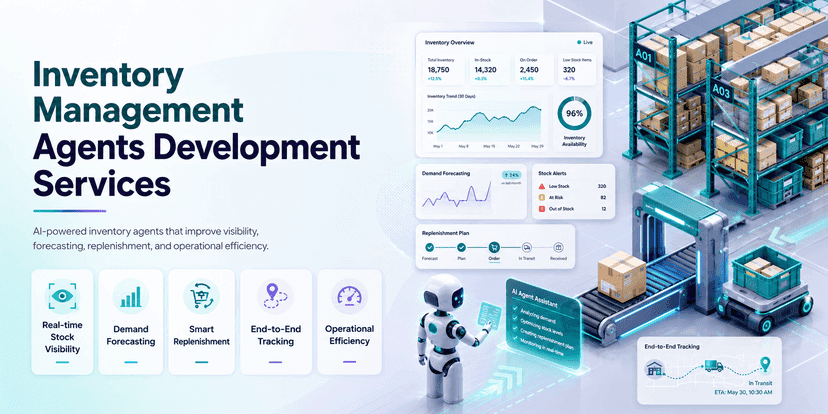
Inventory Management Agents Development Services
 Sasikumar
Most businesses still manage inventory with spreadsheets and simple rules. Someone checks stock by hand. Someone reorders when it runs low. This works fine for a small shop. But it breaks down fast as your product list grows. It breaks down when you add more warehouses, more suppliers, and more sales channels.
Businesses need more than a screen that shows stock numbers. They need a system that watches inventory all the time. It should spot problems early. It should suggest what to do. And it should take action when allowed.
This is what inventory management agents' development services offer.
An inventory AI agent is a smart software system. It helps with tasks like predicting demand, planning reorders, moving stock between warehouses, checking supplier updates, and catching shortages before they happen. A normal inventory tool waits for a person to run a report. An AI agent does not wait. It watches conditions change. It weighs the options. Then it acts, based on the rules your business sets.
Many types of businesses can use these agents. Think retailers. Factories. Wholesalers. Distributors. Hospitals. Online stores. With the right setup, inventory stops being a task you react to. It becomes something you plan ahead of time.
This guide covers what these agents are, how they work, what tasks they can handle, how they get built, what systems they connect to, and how to roll them out safely.
What Is an Inventory Management AI Agent?
An inventory AI agent is software. It uses your business data and AI models. It watches and manages inventory tasks for you.
It does more than answer simple questions. A good agent can look at the full picture and decide the next right step within limits you set.
Here's an example. A normal dashboard might show that a product has only 20 units left. That's it. That's all it tells you.
An inventory agent can do much more with that same fact:
- Compare stock to expected demand.
- Check open customer orders.
- Look at how long the supplier usually takes to deliver.
- Check if new stock is already on the way.
- Work out how much safety stock you need.
- Guess the date you'll run out.
- Suggest – or even create – a reorder.
- Alert the right person.
- Write down why it made that call.
These agents work toward goals you set. They follow the rules of your business. They can watch risk, suggest fixes, and take approved actions across many systems at once.
Think of it as a smart layer sitting on top of your inventory, ERP, warehouse, e-commerce, and reporting tools — watching everything, all the time.
What are inventory management agent development services?
Inventory management agent development services cover the full job. That means design. Build. Connect. Test. Launch. And maintain. All for your inventory work.
This is not just adding a chatbot to your inventory app. It takes real understanding of how your business runs — your data, your approval steps, your systems, and your goals.
A full project usually includes:
- Reviewing your current inventory workflow.
- Picking the right use case to start with.
- Mapping out your data sources.
- Designing the agent's structure.
- Adding forecasting and reasoning models.
- Connecting to your ERP, warehouse, and e-commerce tools.
- Setting business rules and approval steps.
- Building the user interface.
- Adding security and access controls.
- Testing, launching, and improving over time.
The result might be one agent. Or it might be a team of agents working together.
For example, you could run separate agents for different jobs. One for demand forecasting. One for reordering. One for supplier chats. One for stock transfers. One for reconciliation. One for exceptions. A "supervisor" agent can manage all of them and enforce your rules.
Want to learn more about the bigger picture? Read our full guide to AI agent development services.
Why Old Inventory Systems Fall Short
Traditional inventory tools are still useful. They track transactions. They store data. But most of them rely on fixed rules, static reports, and people making manual calls.
This causes real problems.
Decisions Come Too Late
Reports might run once a day, once a week, or only when someone remembers to check. By the time a shortage shows up, you may have already lost the sale.
Data Is Scattered
Stock info often lives in many places – your ERP, your warehouse system, your point-of-sale, your online store, a supplier portal, and a stack of spreadsheets. Someone has to pull it all together by hand before they can decide anything.
Reorder Rules Don't Adapt
A fixed reorder point doesn't know that sales just spiked. It doesn't know a supplier is running late. It doesn't adjust for the season or an upcoming sale.
Too Much Manual Work
Inventory teams spend hours on manual work. They download reports. Compare numbers. Chase suppliers. Build purchase requests by hand.
Too Many Alerts, No Priority
A dashboard might throw 200 warnings at you with no clue which ones actually matter.
Reacting Instead of Planning Ahead
Many teams only respond once stock hits a critical low instead of catching the risk early.
AI-based inventory tools fix this by adding forecasting, smarter reordering, and better monitoring. Inventory agents take it one step further. They don't just show you the problem. They help fix it.
How Inventory Management AI Agents Work
An inventory agent runs on a loop. It repeats these steps again and again.
1. Observe
The agent pulls in data it's allowed to see:
- Current stock.
- Reserved stock.
- Customer orders.
- Past sales.
- Supplier delivery times.
- Open purchase orders.
- Warehouse space.
- Expiry dates.
- Upcoming promotions.
- Returns.
- Weather or seasonal trends.
- Shipping updates.
2. Understand
The agent looks at what's happening right now. Maybe sales are climbing fast. Maybe a shipment is late. Maybe one warehouse has too much stock while another has too little.
3. Predict
It forecasts what's coming — future demand, chances of a stockout, expected delivery times, or how much safety stock you'll need.
4. Plan
It figures out what to do next. That could mean suggesting a reorder, moving stock between warehouses, changing an order size, contacting a supplier, or flagging a shortage to a manager.
5. Check the Rules
Before it acts, it checks your business limits:
- Minimum order size.
- Approved supplier list.
- Spending limits.
- Storage space.
- Budget.
- Required service level.
- Shelf life.
- Who's allowed to approve what.
- When a human needs to sign off.
6. Act
Based on how much freedom it's given, the agent might:
- Send an alert.
- Draft a purchase order.
- Start a stock transfer.
- Update a workflow.
- Open a task for follow-up.
- Ask a manager to approve something.
- Complete an approved transaction on its own.
7. Learn and Get Better
The system tracks what happened and what worked. Your team can then fine-tune the models, rules, and thresholds over time.
This loop — watch, think, act — is what makes an agent different from a normal report.
Key Ways to Use Inventory Agents
The best use case depends on your business — how complex your inventory is, how clean your data is, and what you're trying to fix.
Demand Forecasting Agent
This agent studies past sales and other signals to predict future demand. It can look at:
- Sales history.
- Seasonal patterns.
- Regional differences.
- Where a product is in its lifecycle.
- Promotions.
- Price changes.
- Customer groups.
- Market events.
- Returns and cancellations.
Instead of one forecast a month, it keeps updating its guess as new data comes in.
Automated Replenishment Agent
This agent decides when to reorder and how much to buy. It factors in demand, supplier lead time, open orders, safety stock, minimum order sizes, storage limits, and your budget.
It can suggest a reorder for you to approve — or place the order itself, if the deal fits your rules.
Stockout Prevention Agent
This agent hunts for products about to run out. It can estimate:
- Days of stock left.
- Chance of a stockout.
- Revenue at risk.
- Which customers or orders are affected.
- The earliest restock date.
- Other suppliers you could use.
- Stock available in other locations.
It ranks the biggest risks first, instead of treating every low-stock item the same.
Inventory Transfer Agent
Sometimes one warehouse has too much stock and another doesn't have enough. This agent looks at demand, available stock, shipping cost, delivery time, warehouse space, and service goals. Then it suggests the smartest way to move stock around — saving you money on new purchases.
Inventory Reconciliation Agent
Stock counts often don't match reality. Bad receiving, damage, picking mistakes, missed transfers, returns — all of these cause errors.
This agent compares records across your systems and finds the mismatches. It groups them by likely cause, asks for more info if needed, suggests fixes, and flags the riskiest cases for a person to check.
Supplier Coordination Agent
Chasing suppliers takes a lot of time. This agent can:
- Track expected delivery dates.
- Spot late shipments.
- Ask suppliers for updates.
- Sum up supplier replies.
- Keep your team in the loop.
- Flag big delays.
- Log every conversation.
Any message sent to a supplier should follow the rules. Use approved templates. Keep access controls in place. Keep a full record. Let a human check in when needed.
Inventory Ageing Agent
This agent finds stock that's sitting too long. It looks at how long items have been in storage, how fast they're selling, storage cost, expiry risk, and options like discounts.
It might suggest a markdown, a bundle deal, moving stock elsewhere, sending it back to the supplier, or pausing new orders.
Expiry and Shelf-Life Management Agent
Food, medicine, cosmetics, and chemicals all need close watch on expiry dates. This agent flags affected batches, pushes older stock to sell first, suggests transfers, warns the warehouse team, and flags anything that shouldn't be sold anymore.
Cycle Count Planning Agent
Instead of counting every item the same number of times, this agent prioritises counts based on product value, sales volume, past errors, theft risk, and how important the item is to your business. Your team spends counting time where it matters most.
Order Allocation Agent
When stock runs short, someone has to decide who gets it. This agent applies your rules — customer priority, contracts, deadlines, profit, location, and service agreements — to split limited stock fairly and smartly.
Inventory Query Assistant
Your team often has quick questions, like:
- Which products might stock out this week?
- Why did safety stock go up?
- Which supplier delays are hurting customer orders?
- Where's our extra stock sitting?
- What hasn't sold in 90 days?
A smart assistant answers these using real, approved data. It can also start actions — like building a report or opening a task — not just chat.
Benefits of Inventory Management Agents
Done right, inventory agents can deliver real, measurable wins.
Better Visibility
Agents pull data from many systems into one clear view. You see what's available. What's reserved is What's in transit? What's damaged? What's expected.
Fewer Stockouts
Constant monitoring catches risks early. That gives your team more time to fix things before customers notice.
Less Excess Stock
Smarter demand forecasts and dynamic reordering mean you buy less "just in case" stock — and spend less on storage.
Faster Decisions
Agents can scan thousands of products, orders, and suppliers faster than any team could by hand.
Less Busywork
Routine tasks — pulling reports, chasing suppliers, comparing numbers — get partly automated.
More Accurate Records
Reconciliation and cycle-count agents catch mismatches and point your team to the ones that matter most.
Better Customer Service
Fewer shortages and earlier warnings mean faster order fulfilment and more accurate delivery promises.
Consistent Rules
Agents apply your policies the same way every single time — no shortcuts, no forgetting steps.
Room to Grow
As your business grows, agents can handle more volume without needing a much bigger team.
Inventory Management Agent Architecture
A real, working inventory agent needs several layers working together.
Data Layer
This is where your data lives – structured and unstructured – from:
- ERP systems.
- Warehouse software.
- Order management tools.
- Ecommerce platforms.
- Point-of-sale systems.
- Procurement platforms.
- Supplier portals.
- Shipping systems.
- IoT sensors.
- Spreadsheets and databases.
Your team needs to know which system is the "source of truth" for each type of data.
Integration Layer
This uses APIs, webhooks, event streams, and message queues. It also uses database connections and integration tools. Together, these let the agent read data and trigger actions.
Intelligence Layer
This includes:
- Demand forecasting models.
- Anomaly detection.
- Optimisation tools.
- Large language models.
- Rule engines.
- Search and retrieval tools.
- Product and supplier knowledge bases.
Not every decision needs a language model. Math-based forecasting works better for number-crunching. Language models shine at reading, summarising, and communicating.
Agent Orchestration Layer
This layer controls how the agent:
- Picks the right tool for the job.
- Runs its tasks.
- Handles errors.
- Keeps track of where it is in a workflow.
- Asks for approval.
- Works with other agents.
- Logs its decisions.
Governance Layer
This layer sets what the agent can see and do. It includes:
- Role-based access.
- Approval limits.
- Audit logs.
- Data masking.
- Transaction limits.
- Policy checks.
- Human escalation.
- Model monitoring.
- Security controls.
Experience Layer
This is how people interact with the system — dashboards, apps, chat, email, or alerts.
Inventory System Integrations
How well the agent works depends a lot on how well it connects to your other systems.
Common integrations include:
- SAP.
- Oracle ERP and SCM.
- Microsoft Dynamics 365.
- NetSuite.
- Odoo.
- Zoho Inventory.
- Shopify.
- WooCommerce.
- Magento or Adobe Commerce.
- Amazon seller tools.
- Custom ERP systems.
- Warehouse management systems.
- Barcode and RFID tools.
- Shipping and logistics platforms.
- Supplier management systems.
- Business intelligence tools.
Big software makers are already adding agent features. This covers shortages. Reservations. Stock location. Ageing stock. Counts. Warehouse tasks.
But most businesses still need a custom agent. Why? Because your workflows, legacy systems, data, approvals, and industry rules are unique to you.
How Inventory Agents Get Built
A clear process lowers risk and gets you real results.
Step 1: Name the Real Problem
Don't start with "Let's add AI." Start with a real issue, like:
- Too many stockouts on your best sellers.
- Manual, slow reordering.
- Too much excess stock.
- Messy reconciliation.
- Suppliers running late with no warning.
Step 2: Map Your Current Process
Write down how things work today — the systems, the people, the decisions, the approvals, and the manual steps.
Step 3: Set Your Success Metrics
Good metrics might include:
- Stockout rate.
- Inventory turnover.
- Forecast accuracy.
- Order fulfilment rate.
- Value of excess stock.
- Time spent reconciling.
- Supplier response time.
- How often your team accepts the agent's suggestions.
- Inventory carrying cost.
Step 4: Check Your Data
Look at how complete, clean, and easy to access your data is. Bad product codes, duplicate records, missing lead times, or messy warehouse data will hurt the agent's accuracy.
Step 5: Pick the Autonomy Level
Agents can work at different levels of freedom:
Advisory: The agent only shares insights.
Assisted: The agent suggests an action and preps the workflow.
Approval-based: The agent acts once a human says yes.
Limited autonomy: The agent handles small, low-risk tasks on its own.
Full autonomy: The agent runs a bigger workflow on its own but stays watched and logged.
Most businesses should start with advisory or approval-based agents.
Step 6: Build and Connect the Agent
Now build the models, tools, integrations, screens, rules, and workflows.
Step 7: Test It Hard
Test with:
- Normal transactions.
- Demand spikes.
- Late suppliers.
- Missing data.
- Duplicate records.
- System outages.
- Wrong suggestions.
- Permission errors.
- Big, high-value orders.
- Rules that conflict with each other.
Step 8: Run a Small Pilot
Try the agent on one product line, one warehouse, or one team first. Compare its calls to what actually happened and what your experts would have done.
Step 9: Launch and Watch Closely
Track performance, errors, model drift, feedback, and how well it connects to your systems.
Step 10: Grow It Slowly
Once it's proven itself, expand to more products, locations, teams, or tasks.
Security and Governance You Need
Inventory agents often touch sensitive info. This can be supplier prices. Customer orders. Demand data. Stock value. Warehouse spots. Buying plans.
Security has to be built in from day one.
Key controls include:
- Give access only where it's truly needed.
- Role-based and rule-based permissions.
- Encrypt data, always.
- Secure API logins.
- Manage secrets properly.
- Keep environments separate.
- Require human sign-off on risky actions.
- Log every decision and transaction.
- Guard against prompt injection attacks.
- Validate every tool and input.
- Set clear data-retention rules.
- Watch model output closely.
- Have an emergency shutoff.
Never give an agent full access just because it's "easier". Every action should be limited by role, dollar value, location, product type, business policy, and risk.
Challenges You Should Expect
Inventory agents are powerful. But they can't fix bad data or messy processes on their own.
Bad Data
Wrong inventory records lead to wrong suggestions. Simple as that.
Old, Disconnected Systems
Legacy software often lacks the modern APIs needed for real-time data.
Unclear Rules
Teams sometimes follow "tribal knowledge" instead of written rules – and those rules often differ by location.
Forecasting Isn't Perfect
Sudden market shifts, supplier failures, or changing customer habits can throw off predictions.
Too Much Automation, Too Soon
Giving an agent too much power early on can create real risk — financial and operational.
Getting Your Team on Board
People need to understand how the agent makes its calls — and how to push back or override it.
Measuring Return on Investment
Set your baseline numbers before you start, or you won't know if it worked.
None of these are dealbreakers. A phased rollout, clear logic, strong governance, and ongoing monitoring solve most of them.
Choosing an Inventory Agent Development Partner
Look for a partner that knows more than just chatbots.
Check if they can offer:
- Real supply-chain knowledge.
- Custom AI agent design.
- Forecasting and optimisation experience.
- ERP and warehouse system integration.
- Secure backend development.
- Multi-agent coordination.
- Human approval workflows.
- Audit and monitoring tools.
- Cloud deployment.
- Ongoing tuning and support.
Ask them how they handle problems. Bad data. Permission issues. System failures. Wrong suggestions. Human overrides.
A good partner will suggest a small, measurable pilot — not promise full autonomy on day one.
Cost of Building an Inventory Agent
Cost depends on a few things. How many workflows do you need? How many integrations? How many data sources are there? How many models? How many locations and user roles. How much security you need. And how much freedom you want to give the agent.
A simple assistant that just answers questions costs less. A fully independent system running across many warehouses and suppliers costs more.
Cost usually covers:
- Discovery and process review.
- Data prep.
- Custom model building.
- Agent orchestration.
- ERP and warehouse integrations.
- Dashboard or app development.
- Cloud hosting.
- Security setup.
- Testing.
- Monitoring.
- Ongoing maintenance and tuning.
The smartest approach? Start with one high-value workflow and measure the return. For example, cutting stockouts on your top-selling products often shows results faster than trying to automate everything at once.
What's Next for Inventory Management
Inventory systems are moving from simple record-keeping to smart, real-time operations.
Soon, businesses will run teams of agents working together. They'll cover planning. Buying. Warehousing. Shipping. Sales. Support.
Picture this: A demand agent spots a sales spike. A replenishment agent works out how much more stock is needed. A supplier agent checks what's available. A logistics agent picks the best shipping option. A finance agent checks the budget. A supervisor agent ties it all together and asks for approval.
These connected, agent-based systems are being built to react faster to disruption and keep every part of the chain in sync.
People still matter here — for strategy, negotiation, risk calls, policy, and tough exceptions. The goal of inventory agents isn't to replace your team. It's to clear away the busywork so they can focus on what actually needs a human.
Frequently Asked Questions
What are inventory management agent development services?
These services build AI-powered agents. The agents watch your inventory data. They spot risks. They suggest actions. They carry out approved tasks. The work can include strategy, design, model building, system integration, security, testing, and ongoing support.
How is an inventory AI agent different from regular inventory software?
Regular software logs transactions and follows fixed rules. An AI agent reads changing conditions, pulls data from many systems, weighs options, suggests actions, and can act — all within the limits you set.
Can an inventory agent create purchase orders on its own?
Yes, if it's connected to your procurement or ERP system. Big or unusual orders should still need a human's approval.
Can AI agents predict stockouts?
Yes. They look at stock levels. Reserved units. Sales speed. Expected demand. Supplier lead times. Incoming orders. And any disruptions. Then they estimate the risk.
Do these agents replace inventory managers?
No. They help managers by watching data, flagging problems, and automating routine tasks. People are still needed for big calls, unusual cases, and strategy.
Can these agents connect to my current ERP?
Usually, yes — through APIs, webhooks, database links, middleware, or custom integration work. It depends on what your current system allows.
Which industries can use these agents?
Retail. Ecommerce. Manufacturing. Wholesale. Logistics. Healthcare. Pharma. Food and drink. Cars. Construction. Hotels. Basically any business that manages physical stock.
How long does it take to build one?
It depends on how complex the use case is, how ready your data is, how many integrations you need, and how much autonomy you want. A small pilot moves faster than a full enterprise rollout.
Is my inventory data safe with an AI agent?
It can be safe. The system needs strong logins. Encryption. Limited access. Secure integrations. Audit logs. And human checks on sensitive actions.
What should I automate first?
Pick a process with clean data, lots of manual work, clear business impact, and low risk. Good starting points: stockout detection, reorder suggestions, supplier delay tracking, and ageing stock analysis.
Build Smarter Inventory Operations with Custom AI Agents
Knowing how much stock you have isn't enough anymore. You need to know what you'll need next, where it should sit, what risks need attention right now, and what to do about them.
Inventory management agents give you that — faster answers and less manual work.
A good rollout starts small. Pick one clear problem. Use clean data. Keep integrations secure. Track real metrics. Mix automation with human control.
The right inventory management agents' development services can fix this. You get agents built for how your business really works. Your team won't need to work around generic tools anymore.
Whether you want to stop stockouts, cut excess stock, improve reordering, manage suppliers better, or fix reconciliation issues, start with one strong use case. Prove it works. Then grow from there.
Explore our full AI agent development services. See how custom AI agents get designed, connected, controlled, and scaled — across your whole business.